A Teams dial-in number comes from the organizer’s Audio Conferencing configuration. It is not a phone number you type into the meeting body. When the account is correctly licensed and configured, Teams adds a dial-in number and conference ID to the invitation.
This explains most missing-number cases. If the organizer lacks Audio Conferencing, copying a number from another meeting will not create a valid bridge. If Outlook cannot create a Teams meeting at all, repair the Outlook meeting integration before troubleshooting the phone block.
Confirm the organizer is enabled
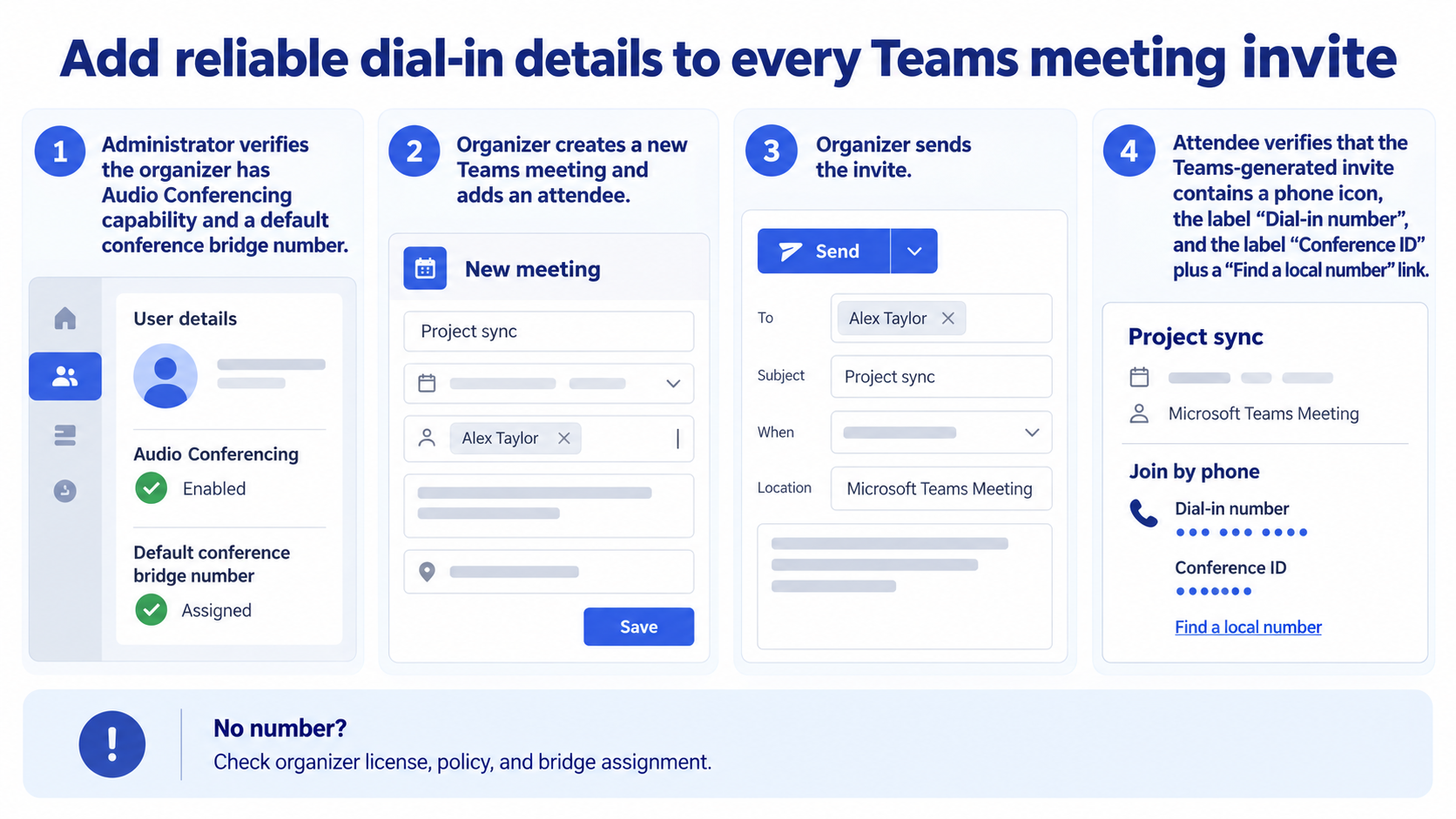
Ask the Microsoft 365 or Teams administrator to verify that the organizer has the required Audio Conferencing capability and conferencing policy. The organizer is the account that creates the event; attendee licenses do not cause phone details to appear on someone else’s invitation.
Separate meeting dial-in from the Calls dial pad
Meeting dial-in lets attendees call a conference bridge and enter a conference ID. The Calls app dial pad is for direct PSTN calling and can have different requirements. If only the personal dial pad is missing, use the calling-policy checks instead of changing a meeting.
The administrator should also confirm a default conference bridge number for the organizer’s region. Toll-free numbers, service numbers, and international coverage can require extra configuration. Begin testing with the default toll number.
Create and send a fresh meeting
Schedule from Teams or Outlook. In Teams, open Calendar, create a meeting, add at least one attendee, and send it. In Outlook, create a Teams meeting and send the invitation. Microsoft notes that the join link and dial-in information may not appear until the invitation is sent to someone.
- Create a one-off meeting owned by the enabled organizer.
- Add a test attendee and a clear subject.
- Send the invitation.
- Reopen the event from the organizer calendar.
- Inspect the delivered invite for a number and conference ID.
Do not judge an unsent draft
An empty draft is not proof of a licensing failure. Send it to a test attendee, then inspect both the delivered copy and reopened organizer item. Avoid pasting old conference details into the body because they can belong to another organizer or meeting.
Validate the attendee experience
Call the displayed number from a phone that is not signed into Teams. Enter the conference ID when prompted. Confirm that the caller reaches the intended lobby or meeting and that the organizer can identify the phone participant.
Check desktop and mobile mail views. Signatures, sensitivity banners, and third-party add-ins can make the block harder to find even when it exists. The dial-in information should remain inside the Teams-generated details rather than a manually maintained paragraph.
If every new meeting lacks a number
Compare a meeting created by another known-enabled organizer. If their invite contains phone details, focus on the affected user’s license, policy, and bridge assignment. If nobody’s invitation includes them, the tenant may not have Audio Conferencing configured.
Allow time after a new license or policy assignment, then create a brand-new meeting. Existing events and series do not always refresh automatically. A fresh meeting is the cleanest test of current configuration.
If Outlook and Teams differ
Create equivalent new meetings in both clients. If Teams adds phone details but Outlook does not, inspect the Teams meeting add-in and the account used in Outlook. If neither client works for the same organizer, return to server-side licensing and policy.
Prepare the invitation for international attendees
If participants call from several countries, open the local-number list linked from the Teams invitation and confirm the regions your bridge supports. Tell attendees that carrier charges may apply and that a local number still uses the same conference ID. Avoid placing a long manually maintained country list in the meeting body because it can become stale.
For accessible meetings, keep the join link and dial-in block intact and include a contact for accommodation questions. The telephone route carries audio; presentation content, chat, reactions, and captions still require the Teams app or browser. Set that expectation before the session.
Keep bridge details intact when forwarding
Forward the original invitation instead of copying only the phone line. The conference ID, local-number link, join URL, and organizer context belong together. Ask recipients not to edit the block or redistribute it beyond the intended audience.
If a mail template or signature tool damages the conferencing block, create a clean meeting and compare the generated message. Fix the transformation at its source rather than maintaining bridge details by hand.
Dial-in setup questions
Can I choose a different local number?
Organizations can configure bridge numbers, and invitations may offer local-number options. The organizer cannot invent an unassigned number. Ask the Teams administrator which service numbers are available for the tenant and region.
Why is there no toll-free number?
Toll-free service can require separate inventory, communication credits, and configuration. A toll number may be the supported default. Confirm the organization’s telephony plan before promising attendees a toll-free option.
Can an external guest use the number?
Anyone with valid meeting details can generally call, subject to meeting and lobby policy. Use appropriate lobby controls and participant verification for sensitive sessions. Never publish dial-in details on an unrestricted page.
Why did a recurring meeting keep old details?
A series can retain the conferencing information created with it. After licensing or bridge changes, test a new one-off event first. If the series must change, update and verify the attendee copy instead of manually editing only visible text.
Make the invitation the source of truth
Once the organizer is enabled, send a fresh meeting and validate the generated phone block as an attendee. Treat license, bridge, meeting, and client as separate layers. That avoids the risky shortcut of copying conferencing information from an unrelated event. Test the displayed number from an external phone before sending the invitation.