Poll anonymity is chosen when the poll is configured, not inferred from whether names appear in the Teams card. Before launch, decide whether the organizer needs named responses, aggregated results, or anonymous feedback. Then preview the poll and verify the setting with a small test because changing privacy expectations after people vote can undermine trust.
Missing responses and visible names are different problems. Privacy depends on options such as Record names of respondents or Keep responses anonymous. Missing results may instead come from a draft that was never launched, an audience that could not access it, or an organizer looking at the wrong Forms owner.
Trace the authoritative result
Where the saved result lives
For microsoft teams forms poll not anonymous, record the exact account, item, client, and result before changing anything. A precise baseline distinguishes an unavailable control from a saved-data, permission, or synchronization failure and gives the later retest a meaningful comparison.
What confirms recovery
The first useful milestone is “Identify the poll owner and open its Forms results.” Once that result is known, continue to “Choose named or anonymous collection before launch” without changing unrelated settings. This keeps the diagnosis narrow enough for a user, owner, or administrator to repeat.
Map the poll type and owner
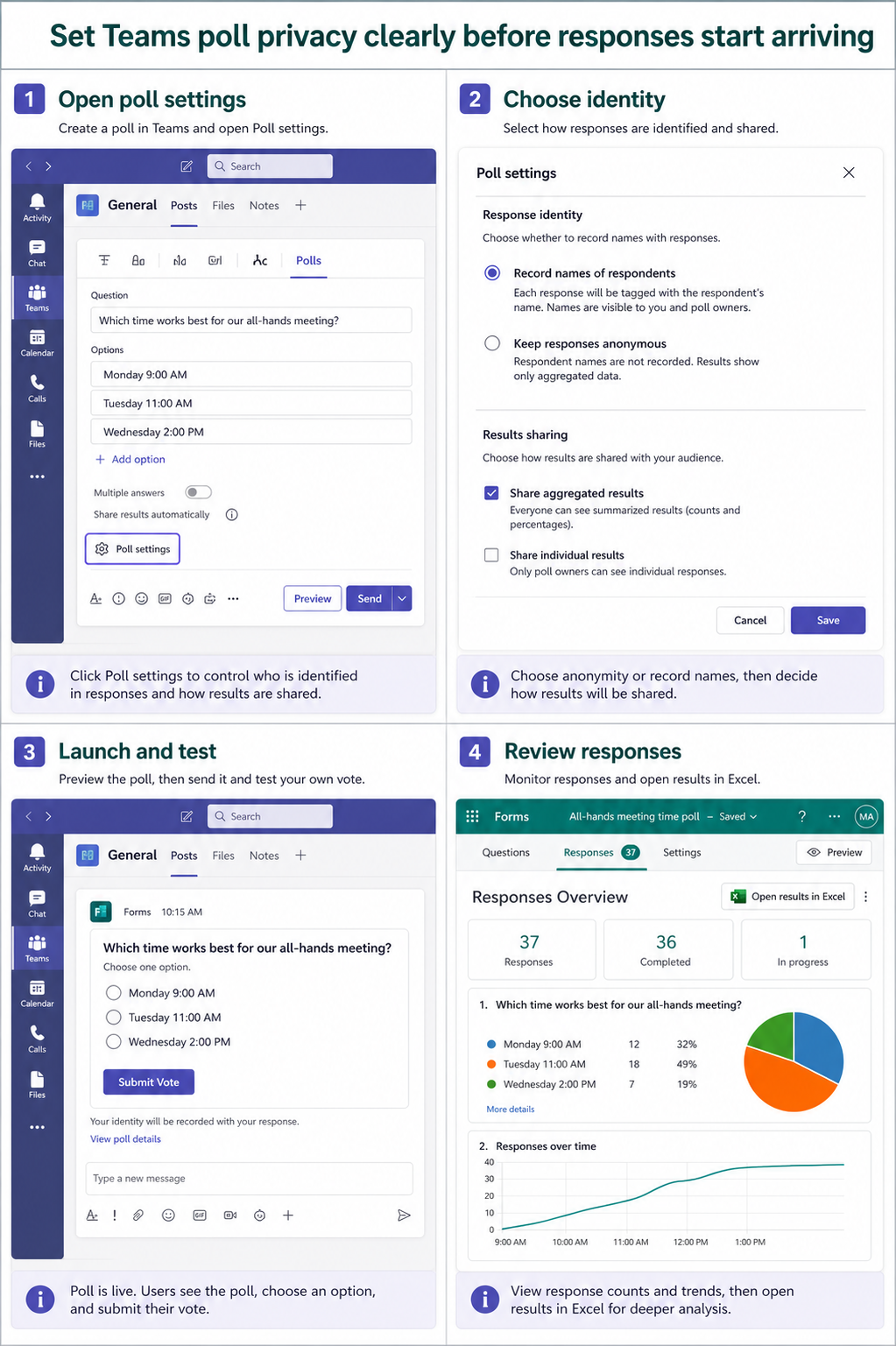
Identify whether the poll lives in a meeting, chat, or channel and which account created it. Open More on the poll card or the meeting Polls tab, then follow the link to the Responses Overview in Microsoft Forms. Only the creator may have the full management view.
Do not use the separate attendance record workflow as a substitute for poll results. Attendance shows who joined, while poll data records submitted answers under the poll’s privacy rules.
Review identity settings before launch
For a Teams chat or channel poll, inspect Record names of respondents. For a meeting poll, inspect Keep responses anonymous and any option that shares results automatically. Preview the exact wording so attendees understand whether identity is collected and who can see the summary.
If votes already exist, preserve the current result set and communicate any mistake. Recreating the poll with corrected privacy may be safer than implying that earlier named responses were anonymous.
Trace missing responses by state
Confirm the poll is launched rather than left as a draft. Ask one eligible participant to submit a test vote and watch the response count in Forms. A forwarded meeting participant or external attendee may have different access and may not be able to create, edit, or receive poll notifications.
Review the wider meeting-access settings when chat or meeting access is also restricted. The poll cannot collect a response from someone who never receives or can open it.
Read results in the correct surface
Use Responses Overview for response count and per-answer totals. If identity recording was enabled, use the detailed or individual results view to associate names and answers. Export to Excel only when your organization permits handling that personal data.
If the Teams card and Forms totals disagree, refresh both, verify the form ID and owner, and test one new vote. Escalate with the poll link, meeting ID, creator account, audience type, and counts—never with unnecessary respondent details.
Run the correction in four controlled moves
- Identify the poll owner and open its Forms results. Record the result before moving on so later evidence stays attributable.
- Choose named or anonymous collection before launch. Keep the test narrow and use the same account that experienced the failure.
- Launch and submit one eligible test response. Do not broaden permissions or delete data to force a passing result.
- Compare Teams card totals with Responses Overview. Confirm the saved or downstream state, not just the visible control.
Use an account-and-client matrix
Build a two-row test: the affected account in its normal client, then the same account in a supported web experience. Add a second approved account only when permission is genuinely in question. Change one condition per row and record the outcome, because simultaneous sign-outs, permission edits, and cache resets destroy the comparison.
Before changing a poll, record its owner, meeting or channel, launch state, identity option, response count, and Forms link. Submit one neutral vote with an eligible test participant. This baseline distinguishes an anonymity choice from a delivery, audience-access, or results-ownership problem.
Preserve the working layer
When one part of the workflow still works, treat it as evidence and leave it intact. A readable calendar, accessible file, successful trigger, visible poll, or accurate new transcript line narrows the failure. Repair the next broken boundary without replacing the healthy source or widening access for everyone.
If a destructive change becomes necessary, confirm the exact target and recovery path with the owner first. For managed Microsoft 365 data, an administrator should preserve identifiers, timestamps, and service evidence before removal or recreation.
Teams poll privacy questions
Can I make an existing named poll anonymous after people respond?
Changing expectations after collection is risky and may not remove identity already recorded. Preserve the original according to policy and create a clearly labeled anonymous replacement when necessary.
Why can participants vote but I cannot see their names?
The poll may be configured for anonymous responses, or you may be viewing an aggregate card rather than creator-only details. Open Responses Overview with the poll owner account.
Why did an external attendee miss the poll notification?
Forwarded or external participants can face limitations in meeting poll access and notifications. Test with the actual audience type and provide an approved alternative response method when needed.
Launch the next poll with known privacy
A control appearing is only partial recovery. Repeat the original workflow and confirm the downstream result in the authoritative service: the shared calendar, Loop page, Forms response store, Teams destination, Copilot citation, transcript, or dashboard hierarchy. Then undo temporary test settings and retain only the targeted correction.
Keep owner and administrator boundaries clear. End users can verify their account, refresh a supported client, and test content they are allowed to use. Owners control sharing and source configuration; administrators control tenant policy, licensing, consent, retention, and service-health escalation. Stop when the evidence reaches one of those boundaries.
The durable fix is the smallest change that explains the symptom and survives a normal retest. Keep the verified configuration, remove temporary test content, and share the precise boundary with the owner of any policy or permission dependency. If the problem returns, compare it with the same baseline before repeating cleanup.