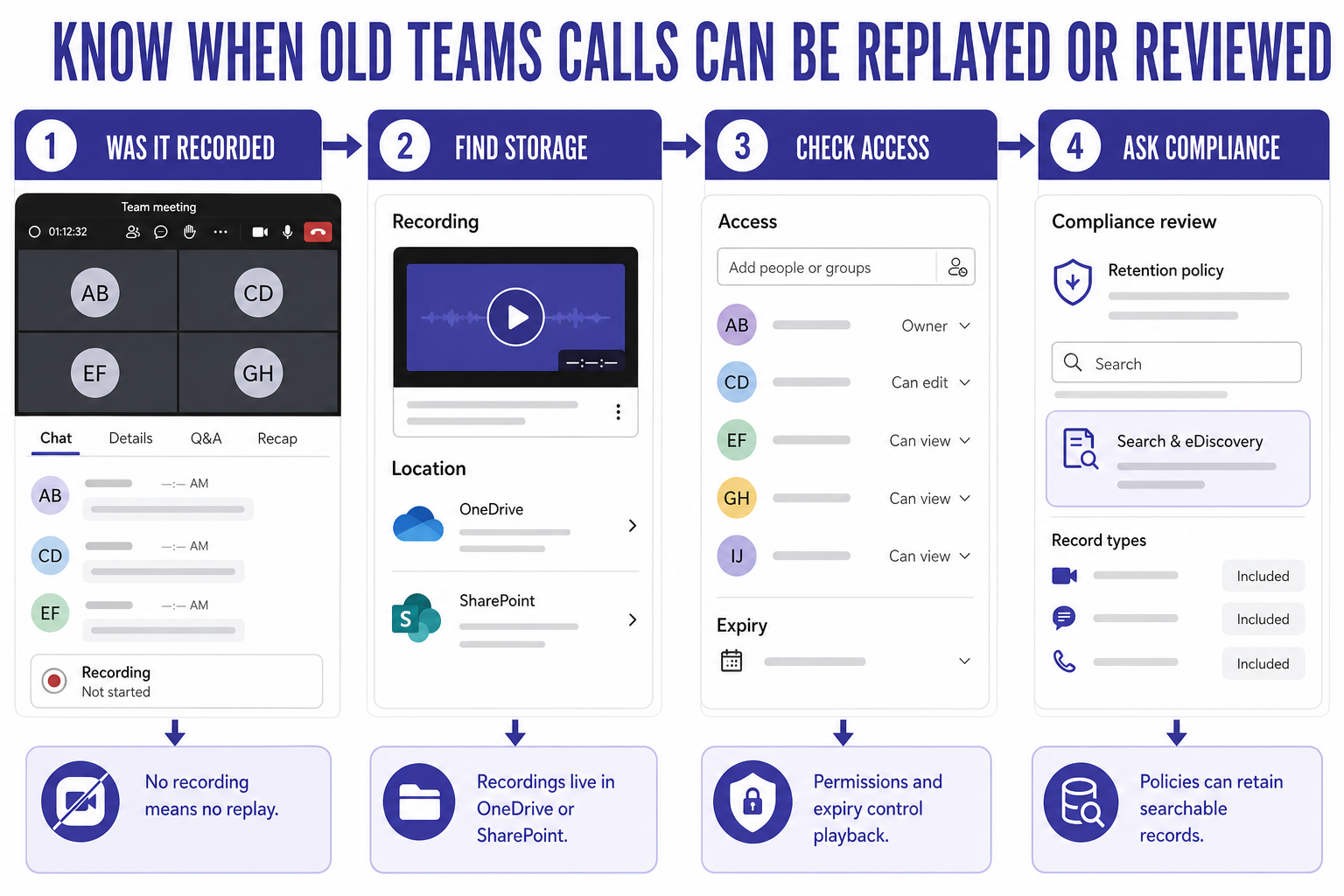
Your employer usually cannot replay an old Teams call unless something from that call was recorded, transcribed, retained, or captured by a compliance system. A normal voice or video call is not automatically a playable recording just because it happened in Teams. The important question is what was created during the meeting and where that item is stored afterward.
That means there is no single yes or no answer. A meeting recording is different from a transcript. A call history entry is different from the audio. A compliance retention record is different from a manager opening Teams and listening to a conversation on demand.
The practical answer
If a meeting was recorded, people with access to the recording may be able to play it later until the file expires, is deleted, or access changes. If transcription was enabled, the transcript or recap may be available to people who have permission. If your organization has retention, legal hold, or eDiscovery policies, administrators or compliance staff may be able to search retained Teams content through approved tools.
If the call was never recorded or transcribed, a normal manager generally does not get a magic playback button for the past audio. They may still see metadata such as meeting details, chat messages, attendance reports, or call records depending on their role and company policies.
Separate calls, recordings, transcripts, and records
A call history entry is not the same as audio
Teams can show that a call or meeting happened. It may show participants, time, chat, attendance, or related meeting artifacts. That does not mean the audio stream was saved as a listenable file.
For privacy questions, separate “someone can see that the meeting happened” from “someone can hear what we said.” Those are different access questions with different controls.
Recordings live as files with permissions
Teams meeting recordings are stored in Microsoft 365 storage, commonly OneDrive or SharePoint, depending on the meeting type and organizer context. That makes the recording behave like a file with owners, viewers, sharing links, retention, and expiration rules.
If you were in the meeting, check the meeting chat, recap, or shared files area. If a recording exists, the UI usually points to it. For mobile or manual review, the guide on where the saved meeting file can be retrieved is useful because the recording may be easier to find from the meeting artifact than from a general file search.
Transcripts and recaps have their own access path
Transcripts, captions, and recap content can create text records even when people think only the meeting video matters. Access depends on meeting settings, organizer choices, tenant policies, and storage behavior. A transcript can be easier to search than a video, so do not assume that deleting a downloaded video copy answers every retention question.
What normal users can check
Start with the meeting chat or calendar event. Look for recording, transcript, recap, attendance, or shared-file sections. If the item opens as a file, check who has access, whether it has an expiry date, and whether the file is in the organizer’s OneDrive or a SharePoint site.
If you own the meeting recording, changing sharing permissions may reduce normal playback access. It does not necessarily override organizational retention, legal hold, or compliance requirements. If the topic is sensitive, ask the Microsoft 365 admin or compliance team what policy applies instead of relying only on visible file sharing settings.
What admins or compliance teams may review
Microsoft 365 administrators and compliance teams can have tools that normal users never see. Microsoft Purview eDiscovery and retention policies can preserve or search certain Teams content when the organization has configured those controls and the user has the right role.
That does not mean every supervisor can casually listen to any old call. It means companies may have governed processes for records, investigations, legal holds, or compliance review. The exact rules depend on your tenant configuration, employment policies, local law, and role permissions.
If a recording exists and needs trimming or preparation for normal sharing, editing the saved video later is a separate workflow from compliance review. Changing a user-facing recording does not automatically erase all retained records or transcripts that policy may cover.
Privacy questions about old Teams calls
Can my boss listen to a call that was not recorded?
Usually not as a replayable audio file in Teams. If no recording, transcript, or compliance capture exists, the past audio is not normally available to a manager as a playback item. They may still see meeting metadata, chat, attendance, or call-log details depending on access.
Can a Teams recording be accessed after the meeting ends?
Yes, if the recording exists and the person has permission. The file may appear in the meeting chat, recap, OneDrive, SharePoint, or a related meeting area. Expiration, deletion, retention, and sharing controls decide how long normal playback remains available.
Can transcripts be searched even if nobody watches the recording?
They can be, when transcription exists and the organization has the right access or compliance tools. Text is easier to search than audio, so users should treat transcripts as separate meeting records. If the meeting topic is sensitive, ask whether transcription and retention are enabled before the meeting.
Who can give a reliable answer for my company?
Your Microsoft 365 admin, legal team, HR, or compliance team can answer for your tenant and policy. Teams behavior is partly technical and partly organizational. A public article can explain the Microsoft 365 pieces, but it cannot replace your company’s written policy or local legal requirements.
The practical boundary
Do not assume every Teams call becomes a permanent recording. Also do not assume that deleting a visible file removes every possible record. The safest mental model is simple: no recording or transcript usually means no normal replay, but recorded, transcribed, or retained content may remain accessible through file permissions or compliance tools.
For sensitive conversations, clarify recording, transcription, and retention before the meeting starts. That is a better control than trying to reconstruct access after the call has already happened.