When a Teams meeting chat disappears after the call, the problem is usually access rather than a broken chat. Teams decides who can keep using the chat from the meeting type, how each person was invited, their RSVP status, organizer settings, and tenant policy. That is why one attendee may still see the thread while another only sees the meeting in Calendar.
Start by separating three symptoms. If the chat is hidden from your Chat list but appears from the Calendar event, it is usually muted or declined. If the chat opens during the meeting but vanishes after everyone leaves, the attendee may have temporary access. If nobody can use the chat, the organizer or admin may have limited meeting chat.
Check whether you had permanent chat access
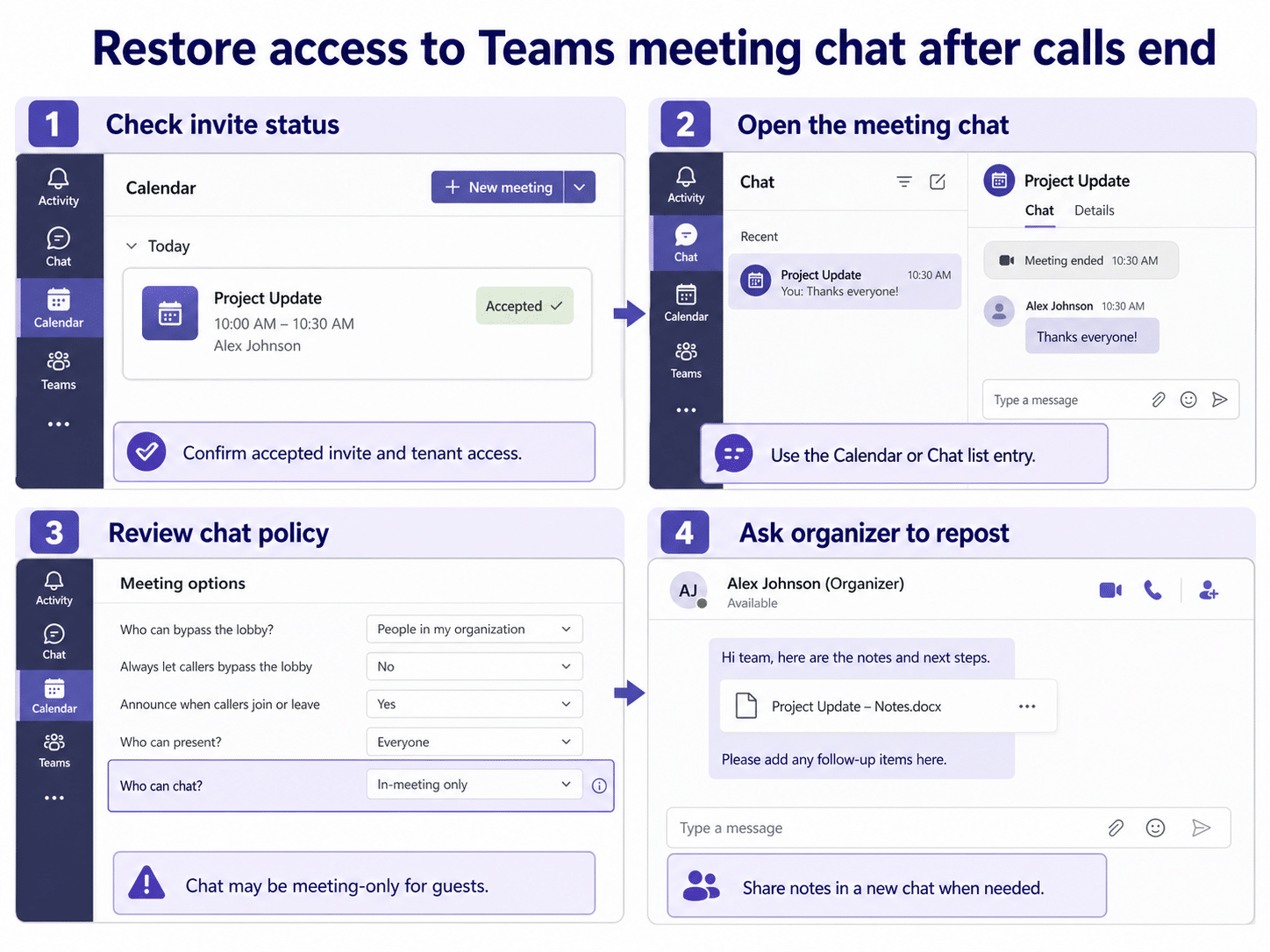
Open Teams, go to Calendar, and select the past meeting. If the event card is still available, choose the meeting and look for Chat with participants or the Chat tab. Also search the meeting title in the Chat list. Meeting chats are often easier to find from the calendar entry because the chat list can hide muted or declined threads.
Permanent chat access is most reliable when you were directly invited to the scheduled meeting and remained in the meeting chat. Temporary access is common for anonymous users, people who joined by forwarded links, and some external attendees. If you were nudged into the meeting, joined from a shared link, or were added after the meeting began, ask the organizer to add you to a new follow-up chat instead of trying to force the original thread to appear.
Declined or muted meetings
If you declined the meeting, Teams can mute or hide the meeting chat unless you sent a message, joined the meeting, or were mentioned. Turn on declined events in Calendar, open the event, and check whether the chat becomes reachable from the meeting card. For recurring meetings, make sure you did not decline the full series when you only meant to decline one occurrence.
Review the organizer’s meeting chat option
Meeting organizers can limit meeting chat before, during, and after the meeting. Ask the organizer to open the past event in Teams Calendar, choose meeting options, and check the chat setting. If the setting only allowed chat during the meeting, attendees may not be able to continue the thread afterward.
This is also a good point to confirm whether the meeting was a channel meeting. Channel meeting chat can appear in the channel conversation instead of behaving like a private meeting chat. If the meeting was connected to a Team channel, open the channel Posts area and look for the meeting thread.
Troubleshoot the common attendee-side causes
Work through these checks before asking IT to investigate:
- Open the meeting from Calendar, not only from Chat.
- Search the exact meeting title in Teams.
- Confirm your RSVP was Accepted, Tentative, or Follow rather than Declined.
- Sign out of Teams, reopen it, and check the web version at teams.microsoft.com.
- Check whether you left or were removed from the meeting chat.
- Ask another internal attendee whether the thread is visible to them.
If the chat exists for internal users but not for you, the issue is probably your invitation path or access level. If nobody can access it, the organizer setting or tenant policy is the stronger suspect.
What organizers should do next?
For follow-up work, the fastest fix is often to create a new Teams group chat with the confirmed attendee list and paste the key notes there. That avoids access issues caused by forwarded invitations, guests, and anonymous join links. If the original chat must be preserved, the organizer should check meeting options and confirm that the attendees were included in the meeting invitation.
Organizers who frequently handle post-meeting discussion should review chat settings before the meeting starts. If the goal is an ongoing follow-up thread, make sure chat is not limited to in-meeting use. For calling and meeting access issues that overlap with chat problems, see our guides to fixing the Teams dial pad missing from Calling and how to call into a Teams meeting.
When this needs an admin?
Contact your Microsoft 365 or Teams admin when multiple internal attendees lose access, meeting chat is missing across desktop and web, or the meeting option cannot be changed by the organizer. Admin policies can restrict meeting chat, external access, guest behavior, and meeting experiences. Give the admin the meeting title, organizer, date, affected users, and whether the issue affects one meeting or every meeting.
Do not keep reposting sensitive notes into unrelated chats until access is clear. If the meeting included guests, forwarded invitations, or anonymous attendees, create a clean follow-up thread with the right membership and share only the information that group should see.
Why can I see the meeting but not the chat?
The calendar event and the chat are separate access experiences. You may still see the meeting because it was on your calendar, but the chat can be hidden, muted, or unavailable after the meeting depending on how you joined and what the organizer allowed.
Can the organizer add me back to the original meeting chat?
Sometimes, but not always. External people who were not invited directly often cannot simply be added to the original meeting chat. A new group chat is usually cleaner when the attendee list changed after the call.
Does clearing the Teams cache bring back missing meeting chat?
It can help if the chat exists but your client is stale. Test Teams on the web first. If the web version also cannot see the chat, cache cleanup is unlikely to fix an access or policy issue.
Why did a recurring meeting chat disappear?
Recurring meeting chat follows series membership. If you were removed from the series, declined the series, or were invited only to a single occurrence, your history and ongoing access may differ from people invited to the full series.
Final check
If Teams meeting chat is missing after a call, first confirm the meeting card, RSVP state, and chat setting. Then compare your access with another invited internal attendee. When the original chat cannot be recovered safely, ask the organizer to start a new follow-up chat and repost the notes to the right group.