When shared calendars are missing in new Outlook, the calendar is often still shared correctly. The visible problem is usually the account being viewed, a collapsed calendar group, an invitation that was never reaccepted, or a desktop session that has not caught up with the mailbox.
Start in the calendar view, not the mail view. If the same user is also adding shared mailboxes in new Outlook, compare the account setup with the shared mailbox setup steps because the mailbox and calendar symptoms often come from the same account context.
Make sure new Outlook is showing the right account
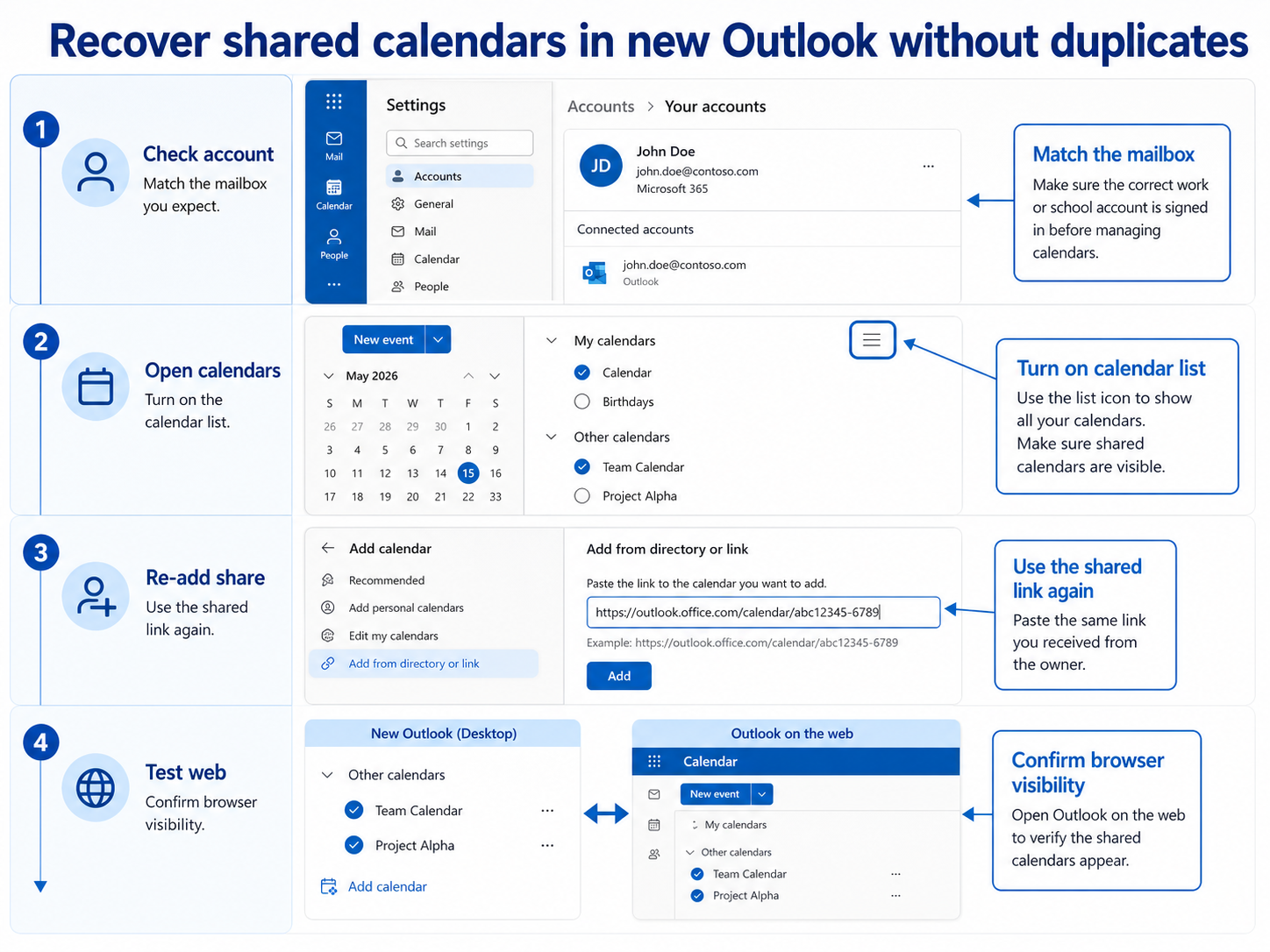
New Outlook can hold more than one account, and shared calendars belong to the account that received the sharing invitation. Open the profile menu and confirm the work account that owns the calendar relationship is active.
- Switch to Calendar view.
- Expand each calendar group in the left pane.
- Look under Shared calendars, Other calendars, and People calendars.
- Use the search box only after confirming the groups are expanded.
If the calendar appears but is unchecked, select it again. If the whole group is missing, continue with the sharing invitation and web checks.
Reaccept the calendar from the owner
Ask the calendar owner to send a fresh sharing invitation. Accept it while signed in to the same work account that should see the calendar in new Outlook. This is often cleaner than trying to repair an old shared-calendar entry that no longer appears.
Pay attention to the permission level. A user who previously had edit access may only have view access after a new invitation, and that can change what they expect to see in scheduling workflows.
Use Outlook on the web as the source of truth
Open Outlook on the web and check the same shared calendar. If it appears there, the share is valid and new Outlook needs a refresh. If it is missing on the web too, the issue is with the sharing relationship or account permissions, not the desktop app.
- Accept the sharing invitation in the browser.
- Confirm the calendar appears in Outlook on the web.
- Close and reopen new Outlook.
- Return to Calendar view and expand the shared calendar groups again.
If the calendar is connected to Teams meetings that do not show correctly in Outlook, compare the broader calendar integration with the Teams meeting missing in Outlook checks after the shared calendar itself is visible.
Questions before you remove the calendar
Why can I see the shared calendar on the web but not in new Outlook?
The sharing relationship is probably valid. Close and reopen new Outlook, expand the calendar groups, and make sure the same account is active. Treat it as a client refresh problem first.
Why did the calendar disappear after switching to new Outlook?
Some shared calendar entries that were visible in classic Outlook may need to be reaccepted or shown from a different calendar group in new Outlook. The calendar owner does not necessarily need to recreate the calendar.
Should the owner share the calendar again?
Yes, if the calendar is missing in Outlook on the web or the old invitation was accepted under the wrong account. A fresh invitation is cleaner than guessing which stale entry new Outlook is trying to show.
The narrow fix is to prove whether the calendar exists on the web for the right account. Once that is clear, you either refresh new Outlook or ask the owner to recreate the sharing invitation.