Deleting a Claude conversation removes it from chat history immediately. Claude does not provide a Trash folder, undo command, or restore button for individual conversations. If the chat was truly deleted, the practical question is not how to reverse the deletion inside Claude, but whether a separate copy was created before the deletion happened.
That distinction matters because Anthropic says deleted conversations are removed from backend systems within 30 days. The processing period is not a user-accessible recovery window, and support documentation does not describe a way to reopen a deliberately deleted chat from it.
Start with the uncomfortable answer
For a personal Claude account, a confirmed deletion should be treated as final in the product. The chat disappears from history as soon as the user confirms Delete. Signing out, clearing browser data, reinstalling Claude Desktop, or waiting for synchronization will not put that deleted item back into the sidebar.
Team and Enterprise retention rules can affect how long organization data exists in backend systems, but they do not create a member-facing recycle bin. Anthropic also states that an organization export initiated after messages, files, or projects were deleted will not include those deleted items.
Before accepting permanent loss, verify that the conversation was actually deleted rather than hidden by account scope, project placement, or incognito mode.
Confirm whether deletion really happened
Use this short elimination list before searching backups:
- Open Chats and tasks instead of relying on the short recent-chat sidebar.
- Switch between personal and organization accounts from the initials menu.
- Open the project where the chat may have been created.
- Search by a distinctive topic, file name, or phrase if chat search is available on the plan.
- Ask whether the session was started as an incognito chat.
- Check Claude’s status page if the entire history disappeared at once.
An incognito chat is not the same as a deleted normal chat. Anthropic says incognito chats never appear in history, and a closed incognito chat cannot be reopened or converted into a regular conversation.
If the conversation appears under another account or project, no recovery is necessary. Move or copy the useful content while it is visible, and label the correct account so the same confusion does not recur.
Search for copies created before deletion
Once deletion is confirmed, work outward from the most complete possible copy. Do not install browser-recovery utilities or grant extensions access to Claude credentials; a local tool cannot reconstruct content that was never saved on that device.
Check an earlier Claude data export
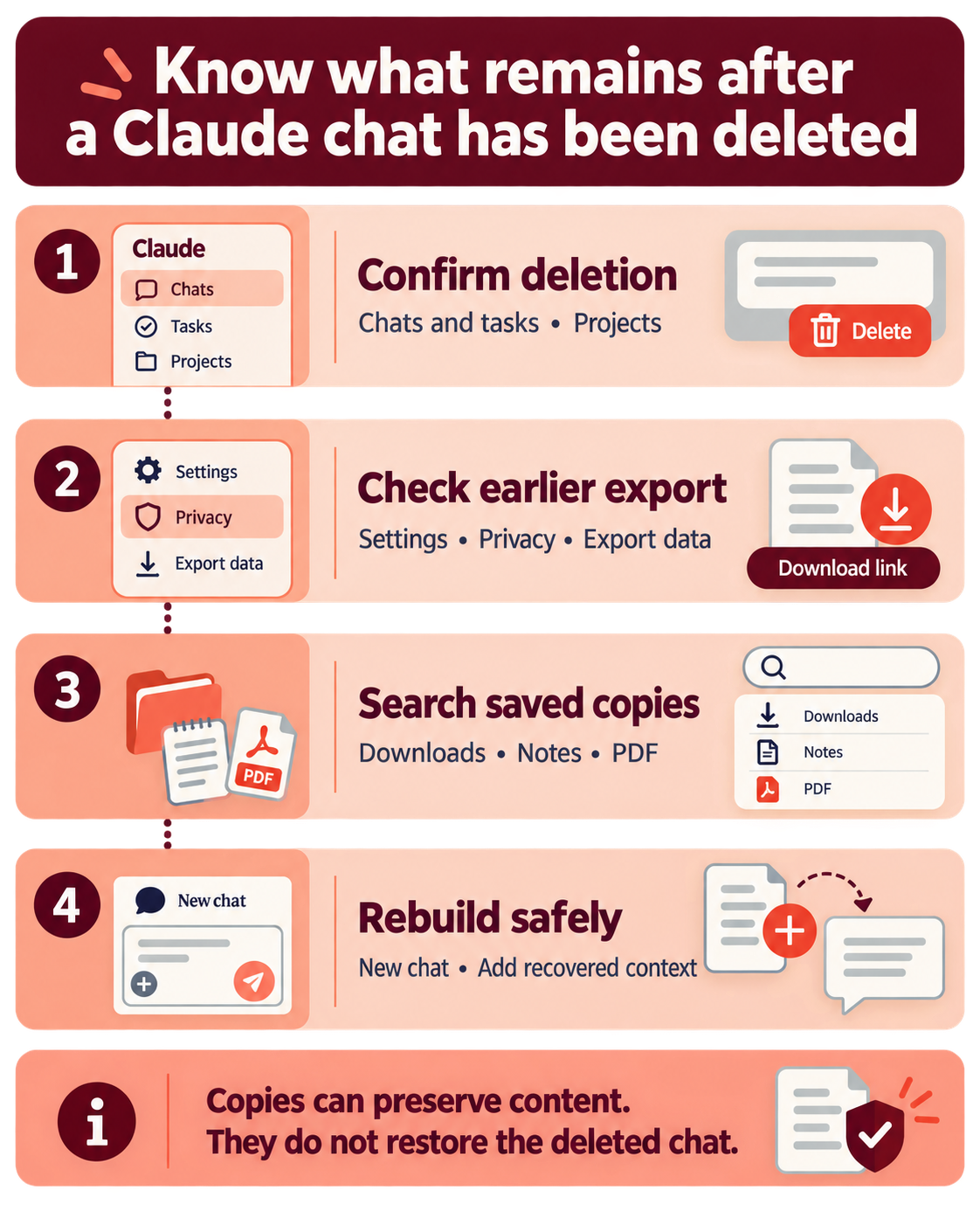
Individual Free, Pro, and Max users can request an export from Settings > Privacy > Export data on Claude web or Desktop. The resulting archive includes conversation data for the account at the time the export is produced.
An export downloaded before the chat was deleted may therefore contain the conversation. Search the extracted files by title, date, or a distinctive phrase. Requesting a new export after deletion should not be treated as a restore method; the current account history is the source being exported.
For Team and Enterprise plans, only the organization’s Primary Owner can initiate a data export. Anthropic explicitly notes that items deleted before that organization export begins are not included.
Look for an offline copy or quoted text
Check downloads, documents, notes, email drafts, issue trackers, and messages where part of the Claude response may have been pasted. If you previously created a local text archive, that file can preserve the reasoning and output even though it cannot be imported back as a live Claude conversation.
Browser print-to-PDF files, screenshots, copied artifacts, and exported documents can also recover useful results. They may not preserve the exact prompt sequence, attachments, or interactive artifact state, so note what is incomplete.
Review shared-chat records cautiously
Personal Free, Pro, and Max users can open Settings > Privacy and choose Manage beside Shared chats. That list shows active shared snapshots and their links. If a relevant snapshot still appears and opens, copy the visible conversation into a safe local document.
Do not assume every deleted chat leaves a working shared snapshot. Sharing and deletion are separate data actions, and access can be revoked. The management list is a place to check, not a guaranteed recovery channel.
Decide what “recovered” needs to mean
There are two different outcomes:
| Goal | Realistic result |
|---|---|
| Reopen the same deleted chat in Claude | No documented self-service method |
| Recover the text or files | Possible only from a surviving export, shared snapshot, download, screenshot, or copied content |
| Continue the work in Claude | Start a new chat and provide the recovered context |
| Restore organization content after member removal | Re-add the same member when applicable, or ask the Primary Owner about exports and retention |
If you recover text, start a new Claude conversation and paste a concise summary plus the latest useful output. Attach original source files again because a copied transcript will not restore attachments or tool connections.
What support can realistically investigate
Anthropic support can help identify account, subscription, export, or access problems. It should not be presented as a guaranteed undelete service. Prepare the account email, approximate deletion time, chat title, plan type, and whether the conversation belonged to a project or organization.
Open the initials menu and choose Get help. Team or Enterprise members who cannot reach a human specialist may need an Owner or designated support contact to escalate. Avoid sending sensitive prompt contents unless support specifically needs them.
If Claude only appeared to lose the chat during a loading failure, try the general application recovery path before reporting deletion. A rendering or sign-in problem can hide existing data, but it cannot recreate a chat after confirmed deletion.
Prevent the next loss without exporting everything daily
Save important final answers when they become operational records rather than waiting until a cleanup session. A lightweight routine is enough:
- Rename valuable conversations so they are easy to recognize.
- Copy final decisions, code, or instructions into the system where the work belongs.
- Export or print high-value conversations at project milestones.
- Confirm the selected chats before using bulk deletion.
- Keep original uploaded files outside Claude.
For organization work, follow the company’s approved storage and retention rules. A personal backup may be inappropriate for confidential data even when it would be technically convenient.
Before you try to recover a deleted chat
Can Anthropic restore a chat during the 30-day deletion period?
Anthropic describes deletion from backend systems within 30 days, but its help documentation does not offer that period as a restore window. Treat a confirmed deletion as final and contact support only to clarify an account or access anomaly.
Will a new data export include the deleted conversation?
Do not rely on it. Organization guidance explicitly excludes items deleted before the export starts, and personal exports describe the conversation data currently available to the account. An export downloaded before deletion is the useful recovery candidate.
Can I import an exported conversation back into Claude?
No. Anthropic says exported personal data cannot be imported into another personal account, and it does not provide a way to turn an exported transcript back into the original live chat. You can use the text as context in a new conversation.
Does closing an incognito chat count as deletion?
It produces a similar outcome but follows a different design. Incognito chats are never saved to history, and Anthropic says they cannot be reopened after closing. Save important content before ending an incognito session.
Treat the deletion confirmation as the recovery boundary
If the conversation exists in another account, project, search result, or active shared snapshot, copy it before changing anything else. If deletion is confirmed, focus on exports made beforehand and independent files rather than promising an in-product undo. Rebuild the work in a new chat only after identifying the best surviving source. That approach is less satisfying than a restore button, but it avoids risky tools and false recovery claims.