Canceling one date in a recurring Outlook meeting is safe when you act on the occurrence, not the series. The distinction appears after you open the event: an occurrence is the selected date, while the series contains the recurrence rule and every scheduled instance. Choosing the wrong scope can send cancellations for far more meetings than intended.
Only the organizer can cancel a meeting for everyone. An attendee can delete a calendar item from their own view, but that does not send an organizer cancellation or remove it from other calendars. Before proceeding, confirm that the From or organizer identity shown on the event is yours or a mailbox you are authorized to manage.
Decide what the calendar should retain
Use a single-occurrence cancellation when one date is unnecessary because of a holiday, conflict, or one-time change. Edit an occurrence instead when the meeting will still happen on that date but needs a different time or location. Change the series end date when all future meetings should stop while past history remains useful.
Do not cancel the series for a one-day exception
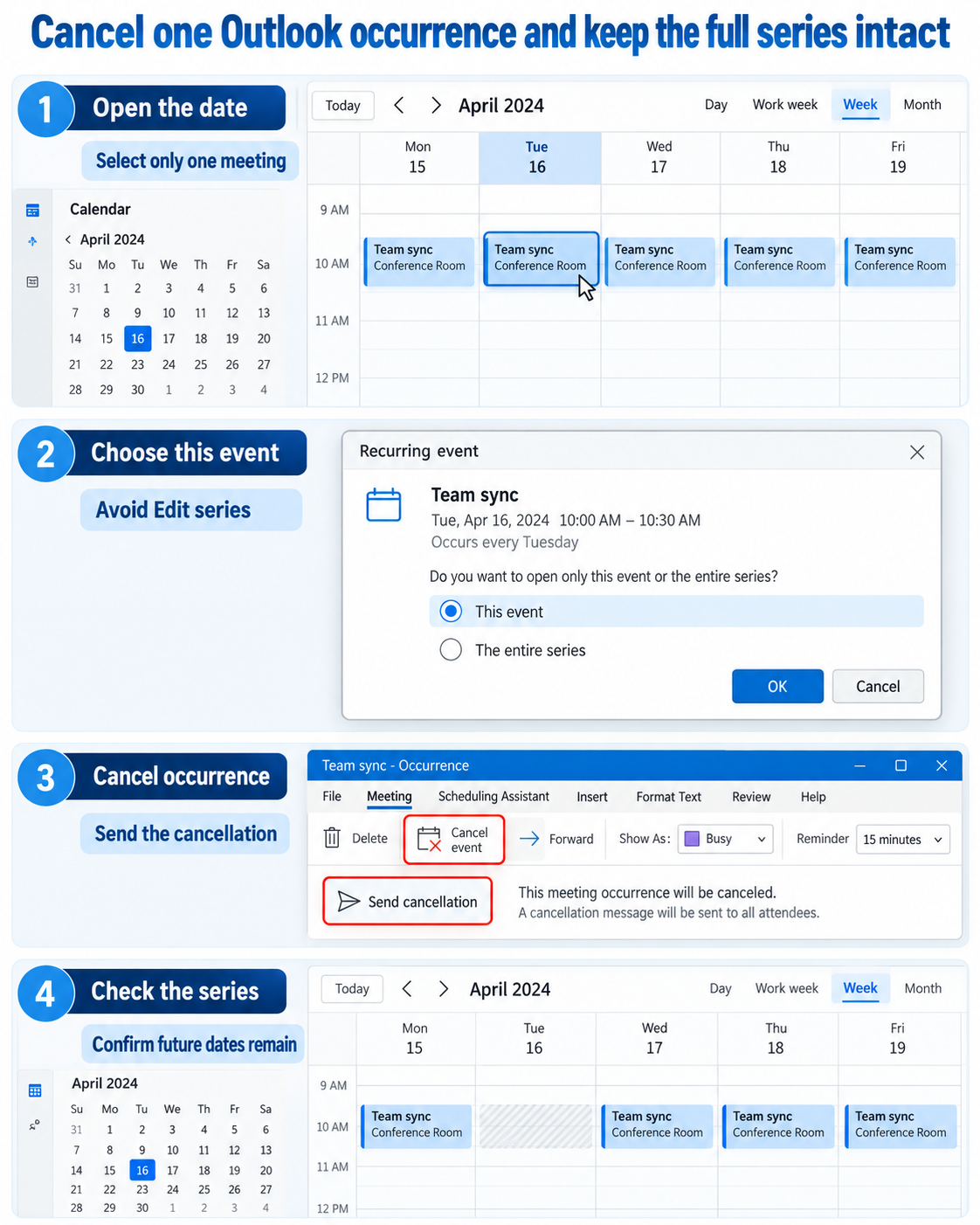
Opening the series exposes the recurrence rule. A cancellation at that scope can remove every occurrence and disrupt attendee calendars. If Outlook asks whether to open “this event” or “the series,” select the wording that refers to the single event or occurrence.
If you already created an accidental copy while experimenting, use the duplicate-event cleanup steps before sending more updates. Clearing the duplicate first makes it obvious which event owns the real attendee list.
Cancel the selected occurrence
Go to Calendar and select the exact date you want to remove. In new Outlook or Outlook on the web, open the event, choose Cancel, and select the option for This event or the single occurrence when prompted. In classic Outlook, open the occurrence and choose Cancel Meeting, making sure you did not open the entire series.
Add a brief note explaining that only this date is canceled. Then choose Send cancellation. Sending matters: closing or deleting the organizer’s local item without sending can leave the original meeting on attendee calendars.
Use a precise cancellation message
Name the canceled date and state whether the next scheduled occurrence remains unchanged. If there is an alternative meeting, include its date or link, but do not turn the cancellation into an ambiguous reschedule request. A sentence such as “The 18 November session is canceled; the weekly series resumes on 25 November” is enough.
Check the result without reopening the series
Return to the calendar and move to the canceled date. That occurrence should be gone from the organizer calendar, while the preceding and following instances remain. Ask one attendee to confirm the same result if the meeting is important or spans multiple organizations.
When the time still looks blocked
Calendar caches and duplicate personal appointments can make a slot appear occupied after the organizer cancellation succeeds. Refresh Outlook on the web, check the Scheduling Assistant, and look for another event at the same time. A broader availability check helps distinguish the deleted occurrence from a separate busy item.
External attendees may process cancellations through different calendar systems, so allow a short delay. If one person still sees the event, ask them to open that item and confirm its organizer and meeting identifier before you resend anything. Sending repeated series updates can create more confusion than it solves.
Recover from the wrong choice
If you canceled the entire series by mistake, Outlook does not offer a reliable universal undo that restores every attendee copy and every exception. Re-create the recurring meeting with the correct dates and explain that it replaces the canceled series. Avoid forwarding an old canceled event because its identity and response tracking may be inconsistent.
If you edited the series instead of one occurrence but have not sent the update, close without saving. If the update was already sent, restore the series settings and send another clear update. Check customized occurrences because changes to the recurrence pattern can remove or reset exceptions.
End future meetings without erasing history
When a project closes, changing the recurrence end date is usually better than canceling the whole series. It preserves past meetings on calendars and stops future dates. Microsoft cautions that changing a series can affect exceptions, so review special occurrences before sending the update.
Account for delegates and shared calendars
If an assistant manages the organizer’s calendar, confirm they have the delegate rights required to send updates on the organizer’s behalf. Opening the item from a copied calendar or forwarded invitation can expose Delete rather than Cancel. Work from the organizer’s actual calendar and verify the organizer line before choosing the scope.
Shared calendar caching can delay the visual result. After sending the cancellation, refresh Outlook on the web and compare it with the delegate’s desktop view. Do not recreate the event simply because one cached view still shows it.
Recurring meeting questions
Why do I see Delete instead of Cancel?
You may be an attendee rather than the organizer, or you may have opened an appointment with no attendees. Deleting removes your copy. If everyone needs the meeting removed, the organizer or an authorized delegate must send the cancellation.
Can I cancel one occurrence from a phone?
Mobile clients may offer a choice between this event and all events, but the wording and available organizer controls vary. For a high-impact series, use Outlook on the web or desktop where the scope is easier to verify. Always read the final prompt before sending.
Will the canceled date return when I edit the series later?
Series-wide changes can affect exceptions, including canceled or modified occurrences. Review the affected date after changing recurrence settings. If the cancellation is business-critical, confirm with an attendee rather than relying only on the organizer calendar.
Should I remove attendees from the single occurrence instead?
Removing all attendees is not the clearest substitute for a cancellation. It can create updates that look like a meeting change rather than an explicit canceled date. Use the cancellation command for the occurrence so calendar clients receive the correct intent.
The safe sequence is scope, cancel, send, and verify. Open the exact date, choose the occurrence, include a date-specific note, and confirm neighboring meetings remain. That small pause at the scope prompt protects the entire series and gives attendees a clean calendar result.