A Power Automate calendar trigger can run twice even when a user creates one meeting. The Office 365 Outlook connector documents a specific case: accepting a meeting can cause When a new event is created (V3) to fire again because Outlook recreates the event with a new ID and created date.
That behavior is different from two flows monitoring the same calendar, a recurring series producing many occurrences, or a downstream action being retried. Diagnose the duplicate in run history before adding delays or turning off concurrency.
Read the two runs as evidence
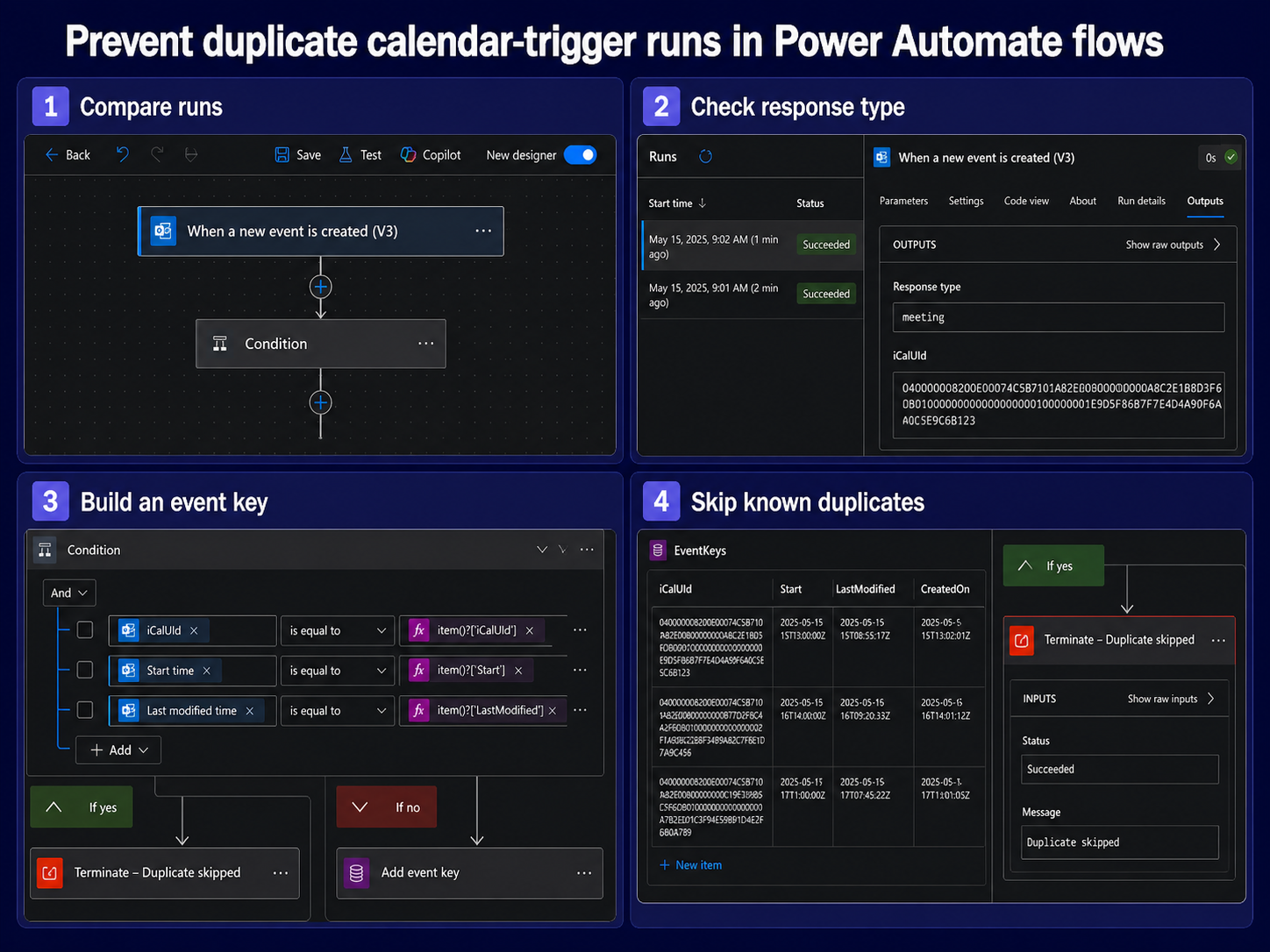
Open My flows, select the flow, and compare the trigger outputs for the two runs. Record the event ID, iCalUId if exposed, subject, start time, response type, action type, and created timestamp. Do not compare only the subject; two legitimate meetings can share it.
Acceptance recreated the event
If the second run follows a meeting acceptance and the event ID changes, filter on the trigger’s Response type output as Microsoft recommends for this connector behavior. The exact accepted value should come from your own run output, because tenant and connector representations can differ.
A recurring series expanded
The When an event is added, updated or deleted (V3) trigger fires for each occurrence in a recurring series. A fifteen-occurrence edit can therefore create fifteen runs. If the flow should act once per series, use a stable series identifier when available and decide explicitly whether the series master or each occurrence is the business object.
Choose the duplicate boundary
Define what “once” means before building a guard. For an attendee notification, once per event occurrence may be correct. For creating a project folder, once per meeting series may be correct. For synchronizing edits, once per event version may be correct.
This distinction also matters when adapting the broader Outlook automation pattern: a trigger is only the signal, while your business key decides whether the work is new.
- Create a key from the most stable available fields, such as iCalUId plus occurrence start.
- Store the key in SharePoint, Dataverse, or another durable system before the expensive actions.
- Query for the key at the beginning of each run.
- Terminate as Succeeded when the key already exists.
- Keep a timestamp and outcome so operators can distinguish a duplicate from a failed retry.
Filter known non-business changes
Trigger conditions prevent a run from starting, while a Condition action starts the run and then branches. Use a trigger condition only after you have captured real trigger output and can test the expression reliably. A Condition is easier to observe during diagnosis because both accepted and rejected cases remain visible in run history.
For an acceptance-related duplicate, compare Response type against the value seen in the second run. For the added/updated/deleted trigger, filter Action Type if your flow should respond only to creation. Avoid filtering on display text that users can change.
Check the connection and trigger checklist if runs disappear after you add a condition. A wrong calendar ID, expired connection, or overly broad expression can make a duplicate fix look like a connector outage.
Do not confuse concurrency with deduplication
Concurrency control limits how many runs execute at the same time; it does not prove that one event creates one run. Setting concurrency to one can reduce races against a shared key store, but both duplicate runs can still execute sequentially.
If two runs read the key before either writes it, use a storage operation that enforces uniqueness or structure the create step so one run wins and the other handles the conflict. A simple “Get items, then Create item” sequence can race under load.
Test with a small matrix
Create a temporary test calendar and perform four actions separately: create an appointment you own, create a meeting with an attendee, accept an invitation, and edit one occurrence of a recurring series. Label each subject with the test case and wait for polling before the next action.
Your expected-results table should state whether each action is ignored, processed once, or processed per occurrence. This makes future connector changes visible without forcing staff to infer intent from expressions.
Calendar-trigger answers
Why did the duplicate run have a different event ID?
Outlook can recreate an event when an invitation is accepted, and the connector documents that this can produce a second trigger with a rewritten ID and created date. Compare iCalUId, subject, start time, and response type to establish that relationship.
Will turning off parallelism stop duplicate notifications?
Not by itself. It can serialize the runs, but each run can still send the notification. Add a durable business key or a condition that excludes the documented acceptance update.
Should I use the created trigger or the added-updated-deleted trigger?
Choose based on the business event you need. The created trigger is simpler for creation-only flows but has the acceptance behavior. The broader V3 change trigger exposes action type and recurring-occurrence behavior, which can be useful when edits or deletions matter.
What if only one run appears but two actions happen?
Inspect retries and loops inside that run. An Apply to each, retry policy, child flow, or connector action may have executed twice. Trigger deduplication will not repair duplication that occurs after the trigger.
Keep the guard observable
Name the early condition or scope clearly, store the deduplication key, and include the skip reason in run history. The best fix does more than suppress a symptom: it shows operators whether the second signal was an acceptance rewrite, recurring occurrence, legitimate edit, or race. That evidence lets you adjust the rule without silently dropping real calendar changes.