Copilot can summarize a Teams meeting and still miss the decision that mattered most. That usually happens when the meeting did not have enough transcript context, people used vague language, or the prompt asked for a general recap instead of decisions with owners. A good decision summary is not just a list of topics.
It should say what was decided, who owns the next step, and what date or condition matters. Copilot can help produce that, but you have to give it the right meeting context and a precise prompt.
Use the flow below after the meeting recap is available, or during the meeting if your organization allows Copilot use in live meetings.
Make sure Copilot has meeting context
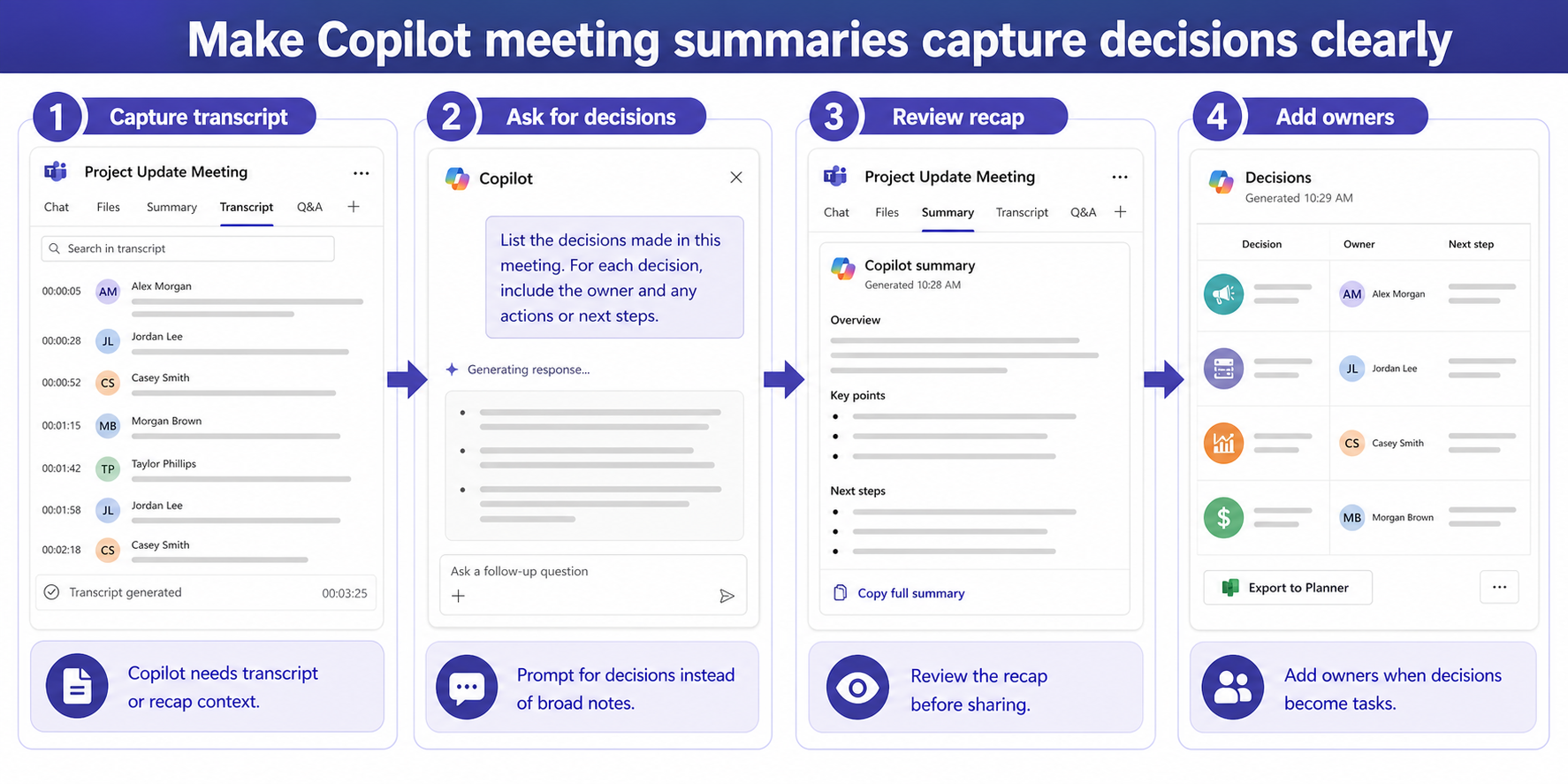
Copilot needs transcript or recap context to answer decision questions reliably. If transcription was off, if Copilot was not available for the meeting, or if the meeting chat has very little detail, the summary may become generic. Open the recap and confirm that transcript, speaker, and topic information are present.
If you are still setting up the basics, start with how to the prompt review workflow. Once the recap is available, move from broad summary prompts to specific decision prompts.
Check before prompting:
- The meeting was eligible for Copilot in your tenant.
- The recap or transcript is available.
- The organizer did not restrict access to the meeting content.
- You have permission to view the recap.
Ask for decisions, owners, and evidence
Do not ask Copilot to summarize the meeting if you need decisions. Ask directly: List the decisions made in this meeting. For each decision, include the owner, supporting discussion, risks, and next step. This tells Copilot to separate decision language from ordinary discussion.
If the first answer is weak, follow up with a narrower prompt: Which items sounded like decisions but still need confirmation? That is useful for meetings where people said phrases like let’s go with that, agreed, or we will proceed, but did not name the owner.
For recurring project meetings, save a standard prompt. When a recap misses important points, compare the problem with the steps to that recap troubleshooting path so you can tell whether this is a context problem or a prompt problem.
Turn the answer into usable notes
After Copilot returns the decisions, review each item against the transcript or meeting recap. A decision without an owner may still be useful, but it should be labeled as needing confirmation. Do not paste unreviewed Copilot output into minutes for sensitive meetings.
Use a simple table with columns for decision, owner, due date, source context, and open question. This format makes the summary actionable and helps you spot vague items. If a decision is really just a recommendation, rewrite it before sending.
Use this review pass:
- Remove duplicate decisions that describe the same outcome.
- Add names where Copilot used only team or group labels.
- Mark unclear decisions for organizer confirmation.
- Keep the meeting link or recap reference with the notes.
Improve the next meeting
Copilot performs better when decisions are stated clearly in the meeting. Encourage the chair to say: Decision: we will do X, owner is Y, deadline is Z. That phrasing is not only useful for Copilot. It also makes the meeting easier for humans to follow.
At the end of the meeting, ask Copilot for open decisions and unresolved questions while attendees are still present. That gives the group a chance to correct the summary before everyone leaves.
Extra platform checks before you move on
Why does Copilot include tasks but not decisions?
Tasks often have clearer action language. Decisions may be implied in conversation, so ask specifically for decisions, owners, and the supporting discussion.
Can Copilot create official minutes automatically?
It can draft helpful notes, but a person should review accuracy, permissions, and sensitive content before sharing official minutes.
What if there is no transcript?
Copilot has much less context. Use the chat, shared notes, and meeting artifacts, or ask the organizer to confirm decisions manually.
Use a decision-first prompt
The fix is usually not a longer summary. It is a better question. Ask Copilot for decisions, owners, evidence, and unresolved items, then review the output against the meeting context. Once the team starts stating decisions clearly during the call, Copilot summaries become more consistent and easier to trust.