Message recall in new Outlook is a recovery request, not a universal erase button. It can work when you and the recipient use Microsoft 365 work or school accounts in the same organization and the recipient has not opened the message. External addresses, personal Outlook.com accounts, and already-read mail fall outside the most favorable scenario.
Act promptly, but first confirm what happened. If the message is still in the Outbox, you may only need to stop sending. If it appears in Sent Items, recall is the relevant tool. When delivery itself is uncertain, use the outbound-mail checks before creating several contradictory follow-ups.
Triage the mistake in the first minute
Classify the problem: wrong attachment, missing attachment, wrong recipient, inaccurate text, or sensitive data. Recall may reduce exposure, but serious privacy or security incidents still need your organization’s reporting process. Do not wait for the recall report before alerting the responsible security or compliance contact when policy requires immediate action.
Decide whether recall is eligible
Check that the recipient belongs to your organization and uses a Microsoft 365 work or school mailbox. A distribution list may include people outside the tenant, producing mixed results. Recall outcomes can also differ by recipient because one person may have opened the message while another has not.
Microsoft does not present recall as a fixed one-hour guarantee. Review the timing and eligibility details if the message is older, but let the report determine the actual outcome rather than assuming age alone decides it.
Submit the recall from Sent Items
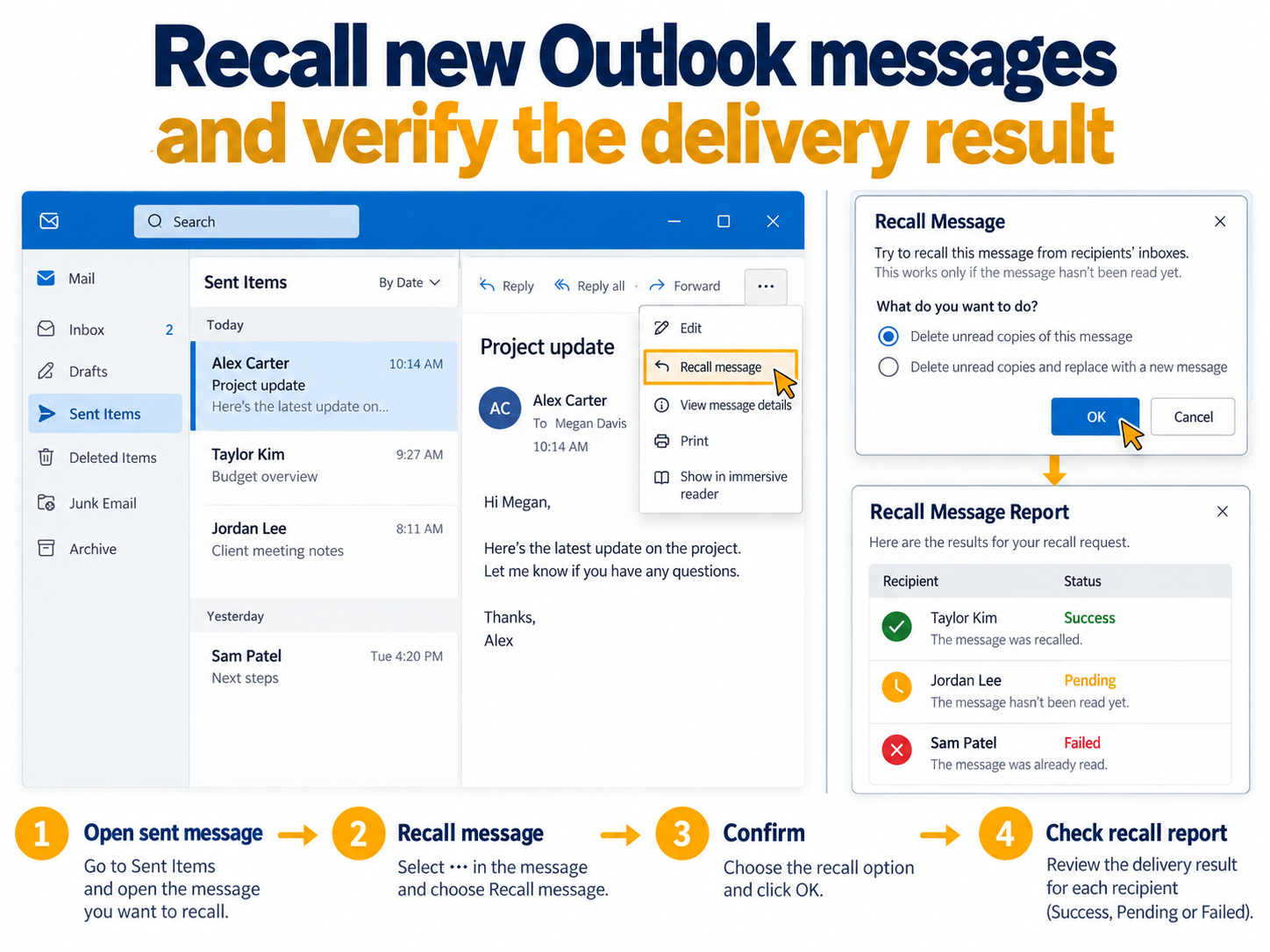
Open Sent Items, then double-click the message so it opens in a separate window. On the ribbon, choose Recall Message and confirm with OK. New Outlook sends the request and later delivers a Message Recall Report to your Inbox.
If Recall Message is missing, confirm that the message is open in its own window and the account is an eligible organizational account. The command will not become available for unsupported external recipients merely because you switch clients.
Read the report before choosing the correction
The report usually arrives shortly after the request. Open it and follow its status link to see whether recall succeeded, is pending, or failed for recipients. Keep the original subject in mind because the report names the recalled message.
Success does not replace the message
A successful recall retrieves the eligible original. If recipients still need the information, send a corrected message with a clear subject and concise explanation. Recheck the recipient list and attachment before sending; urgency is a common reason people repeat the original mistake.
Pending needs patience, not repeated recalls
A pending state means processing is incomplete. Refresh the report later. Repeated recall attempts do not improve an ineligible recipient and can create additional notices or uncertainty.
Failure requires a direct response
When recall fails, assume the recipient can access the original. Send a correction that states exactly what should be ignored or replaced. If data was disclosed to the wrong person, follow the incident process rather than relying on a polite deletion request as the only control.
Use Undo Send for the next mistake
Recall happens after Outlook sends the message. Undo Send delays delivery for a short configured interval, giving you a chance to cancel before it leaves. If your account supports it, open Outlook settings and enable the longest practical delay. It will not help with a message that has already been delivered.
Build a final-send habit for high-risk mail: verify recipients, expand distribution lists, open attachments, and read the subject aloud. Delay is useful, but it should support review rather than replace it.
Handle sensitive information as an incident
Recall results do not replace a security assessment. If the email contained personal data, credentials, contracts, or confidential attachments, notify the approved internal contact with the recipient list, subject, send time, and recall status. Do not forward the sensitive content again merely to explain the problem.
If the recipient is known and trusted, a direct request to delete the message can support the response, but it is not proof of deletion. Follow the organization’s evidence, containment, and notification rules. Preserve the recall report because it shows which mailboxes succeeded, failed, or remained pending.
For a routine wording mistake, a concise correction may be enough. Match the response to the actual risk instead of sending a dramatic second message that draws attention to harmless content.
Recall result questions
Will the recipient know that I tried to recall the email?
The recipient experience can vary with the client and outcome, so do not base your response plan on invisibility. If the content needs correction, send a transparent follow-up. For sensitive incidents, use the organization’s formal channel regardless of what the recipient sees.
Can I recall a message sent to Gmail or another company?
The supported recall scenario requires Microsoft 365 work or school accounts in the same organization. Treat external mail as non-recallable. Send a correction and involve security or legal teams when the content creates risk.
What if only some recipients show success?
Handle the result per recipient. The successful recipients may no longer have the original, while failed recipients should be assumed to have it. A corrected message can go to the full audience if it is worded so both groups understand which version is authoritative.
Does deleting the message from Sent Items recall it?
No. Deleting your copy changes only your mailbox. Use Recall Message and read the report. Preserve evidence required by policy before deleting local items related to a business or security incident.
Choose the next action from evidence
The recall report is the decision point. Submit one recall, review the per-recipient state, then correct or escalate based on what actually happened. New Outlook gives you a useful recovery tool, but clear follow-up and incident handling remain necessary whenever retrieval is incomplete or the original message carried sensitive information.