A playable voicemail with no text is different from a voicemail that never arrives. Treat those as separate paths. Transcription policy and detected language affect the first; calling, mailbox delivery, licensing, and client retrieval can affect the second.
Classify the missing result
Leave a short test voicemail with clear speech, a quiet background, and the user’s expected language. Check the voicemail in Teams and in the associated mailbox. Record whether audio exists, whether a transcription area is blank, and whether the issue affects one caller or every message.
If calls also fail to reach voicemail, start with the broader calling checks because transcription cannot occur without a successful voicemail deposit.
After each change, repeat the smallest test that originally failed. A successful result in a different client narrows the fault but does not automatically repair the original one. Record the boundary, apply the targeted correction, and test again in the user’s normal workflow.
Check what the user can control
Open Teams calling and voicemail settings. Confirm Cloud Voicemail is enabled for the user, the answering rule allows callers to leave a message, and the prompt language is appropriate. A prompt language setting is not a guarantee that poor or mixed-language audio will transcribe perfectly, but it is useful evidence.
Compare desktop, web, and the mailbox copy before clearing anything. If text exists elsewhere, the service completed transcription and only one client view is stale.
A useful test changes one variable at a time. Keep the same account and content while switching only the client, then keep the client and switch only the account or item. This produces evidence you can act on instead of a pile of unrelated resets.
Hand the policy check to the admin
Voicemail transcription policy
Microsoft documents a voicemail policy setting that controls whether Cloud Voicemail generates text and includes it with the message. The default may be enabled, but assigned custom policies can differ.
User assignment and licensing
Ask the admin to confirm the effective policy for the affected user, not just the global default. Also verify the calling and voicemail entitlement appropriate to the organization.
Delivery path
If the voicemail email is missing too, mailbox rules or mail flow can be relevant. Do not change transport rules without evidence and administrator review.
Avoid destructive cleanup until you know whether the authoritative copy is in the cloud, mailbox, calendar, or local profile. Export or verify important data first. In managed environments, a policy result should be handed to the administrator with exact timestamps and reproduction steps rather than worked around.
Repair a display-only fault
Sign out of Teams, fully quit it, and check the web client. If web shows the transcript but desktop does not, update Teams and use a careful client-cache reset only after preserving unsent work. A cache reset cannot override a transcription policy, so it belongs late in the decision tree.
After each change, repeat the smallest test that originally failed. A successful result in a different client narrows the fault but does not automatically repair the original one. Record the boundary, apply the targeted correction, and test again in the user’s normal workflow.
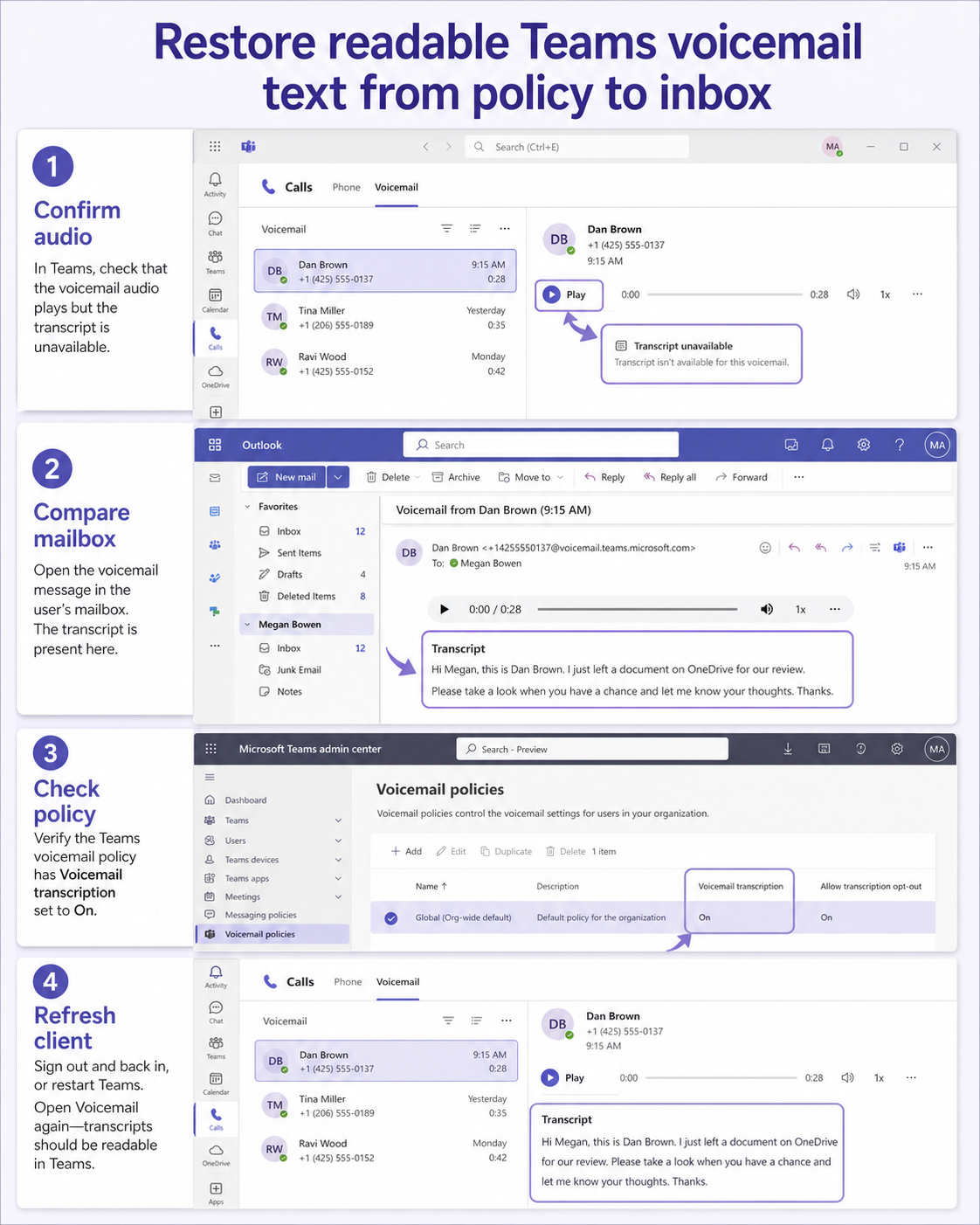
Use the mailbox copy to locate the break
Use a harmless Teams session for the final comparison, not the user’s confidential production content. Note the signed-in account, client, approximate time, and exact visible result. Then repeat the same action once from a second supported client. A difference between clients points toward local state or a client-specific experience; the same result everywhere points toward the account, source data, policy, or service.
Keep the test matrix small enough to explain. One row can represent the normal user and original item, a second the same user with a clean test item, and a third an approved comparison account when available. Change only one condition between rows. This discipline matters because simultaneous sign-outs, cache clearing, permission changes, and item recreation can hide the cause and make the next incident harder to diagnose.
Check the owner boundary before applying the result. End users can usually refresh a client, choose a supported item, or correct their own setting. Owners control sharing and source data. Administrators control tenant policy, effective assignments, managed browser rules, licensing, and service-health escalation. Stop at that boundary and provide evidence instead of asking the user to bypass a security decision.
Finally, return to the ordinary workflow and repeat the exact action that failed. Confirm both the immediate screen and the downstream result: the other attendee’s view, the saved calendar item, the mailbox copy, the flow run, the synced browser data, or the participant’s lobby entry. A button appearing is only partial recovery when the expected output is still missing.
Voicemail transcription questions
Why is the audio present but the transcription blank?
That pattern points toward transcription policy, unsupported or poorly detected speech, processing failure, or client display. Test a clear message in the expected language and compare the mailbox and web client.
Can users enable voicemail transcription themselves?
The governing transcription capability is an administrative voicemail policy. Users can manage some voicemail preferences, but they cannot override a policy that disables transcription.
Does profanity masking turn transcription off?
No. Profanity masking changes how detected words are represented; it is separate from the policy that enables transcription. Check the main transcription setting first.
Use one message as your trace
The best result is a repeatable test that identifies the responsible layer and leaves the user’s data and security controls intact. Keep the successful change, undo speculative ones, and share the narrow evidence with the owner of any policy or service dependency. Retest in the normal client before treating the incident as resolved. If the symptom returns, compare it with the recorded boundary before repeating cleanup; recurrence after the same trigger is far more useful than a vague report that the app failed again.