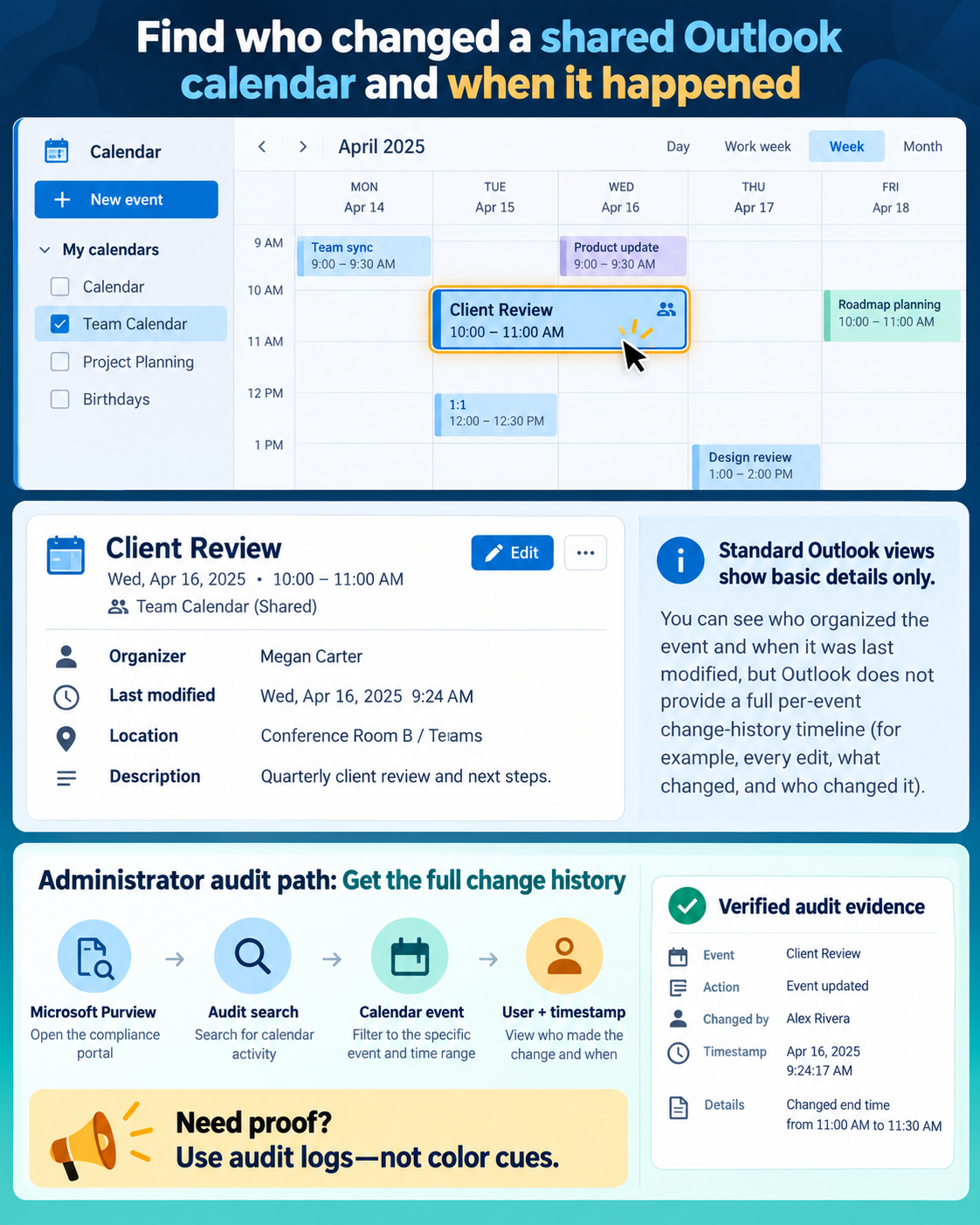
Outlook does not provide a simple cell-style change history for every shared-calendar event. The event can show its organizer and current details, and some views expose a last-modified value, but that is not a complete timeline of who changed each field. When the question requires defensible actor and timestamp evidence, an authorized administrator should search Microsoft 365 audit records.
Treat the investigation as two levels. Use Outlook first to rule out ordinary organizer, delegate, or synchronization confusion. Escalate to audit search only when the business needs proof, because audit access, retention, licensing, and available event properties vary by tenant.
Collect the event facts before searching logs
Open the event from the shared calendar and record its subject, organizer, start and end times, calendar owner, recurrence status, and the time the unexpected change was noticed. Capture the current value without editing it. If the event is one occurrence in a series, note both the series and occurrence because recurring meetings can produce related records.
Ask whether a delegate, mobile client, booking process, or automation legitimately manages that calendar. The shared calendar troubleshooting path helps separate visibility and synchronization symptoms from an actual modification. A stale client can display an old value even when the server item is correct.
- Preserve the event subject and time range.
- Identify the calendar owner and organizer.
- Record whether it is recurring.
- List editors, delegates, and automations.
- Do not make a test edit to the disputed event.
Know what Outlook can and cannot prove
Organizer is not the same as last editor
The organizer created the meeting relationship, but a person with edit or delegate rights may change the calendar item later. Seeing the organizer’s name does not establish that the organizer made the disputed edit.
Last modified is only a clue
A modified timestamp can narrow the audit window, but it does not explain every field change or actor. Synchronization, meeting updates, and service processing can also affect item metadata. Use it to define a search range, not as the final conclusion.
Color and category changes are not evidence
Calendar color can come from the calendar, a category, or a local view. It should never be used to identify the editor. Preserve the event and search the service audit trail when attribution matters.
Search Microsoft Purview Audit for calendar activity
An authorized compliance or audit user can open the Microsoft Purview portal, select Audit, choose a time range, and search for Exchange mailbox or calendar activities relevant to the incident. Limit the search with the suspected user, calendar owner, and narrow date range. Export results when the investigation requires review outside the portal.
Interpret the returned operation, user, timestamp, item identifiers, and available parameters together. A record that a calendar item was updated is stronger than a screenshot, but fields differ and retention limits apply. Match the audit time with the event identity and surrounding actions. The permission-level overview can help explain why the recorded actor had access, but permissions alone do not prove a particular edit.
Preserve evidence and fix the control gap
Save the audit export in the approved case location, note the query filters and time zone, and avoid pasting sensitive calendar details into an open team chat. If records are absent, document the tenant’s retention boundary and the exact search performed rather than claiming that no change occurred.
After attribution, address the reason the edit was possible. Remove obsolete editor or delegate access, repair an automation connection, define who maintains recurring series, or create a dedicated team calendar. Do not respond by granting broader access to everyone or by relying on informal color conventions.
Build a repeatable calendar evidence routine
For calendars that drive customer visits, on-call coverage, or executive schedules, maintain a short owner list and review editors quarterly. Keep business-critical changes in an approved request channel so the audit record can be matched to an authorization. This creates accountability without turning every schedule adjustment into an incident.
Use a harmless test calendar to validate your audit process before a real dispute. Make one change through Outlook and another through an approved automation, then confirm which activities appear and how timestamps are represented. Tenant settings and licensing can change the detail available, so the tested path is more reliable than a generic screenshot.
Record the time zone used by Outlook, the audit portal, and the investigator. A correct event can appear unrelated when one timestamp is local and another is UTC. Normalize times in the case note and preserve the original exported values so another reviewer can reproduce the match.
Questions about Outlook calendar change evidence
Can Outlook show every previous value of an event?
Not as a simple end-user timeline. Outlook shows the current item and useful clues, while service audit records may identify relevant operations. The exact old and new field values are not guaranteed for every activity.
Who can search the audit log?
A user needs the appropriate Microsoft Purview audit or compliance permissions. Calendar editors do not automatically receive audit-search access, and investigations should follow organizational privacy rules.
Why might the audit search return nothing?
The date can fall outside retention, the selected activity or user filter can be wrong, the event can be in another mailbox, or the relevant operation may not expose the expected detail. Broaden filters carefully and document limits.
Can a delegate change a meeting without becoming the organizer?
Yes. Delegate or editor rights can allow calendar maintenance, while the meeting’s organizer relationship remains associated with the owner. That is why organizer alone is not proof of the last editor.
Use Outlook for clues and audit logs for proof
Begin with the event identity, calendar ownership, and known editors. Use the visible modified time only to narrow the window. When attribution matters, have an authorized administrator search and preserve Microsoft Purview audit evidence, then correct the permission or process that allowed the disputed change.