Power Automate can resubmit multiple flow runs from run history, but a bulk retry should come after diagnosis. Resubmission reuses earlier trigger inputs and can repeat every downstream action. If the flow sends mail, creates records, posts messages, or charges an external system, an unplanned retry can duplicate work.
The current bulk experience allows up to 20 selected runs. Use that convenience as a controlled recovery tool: group failures by cause, repair the connection or action, check whether earlier steps already completed, and then resubmit a small verified batch.
Group failures by cause before selecting runs
Open My flows, select the cloud flow, and review All runs. Filter or scan for Failed status, then open representative runs and expand the first failed action. Record the error code, connector, input, and timestamp. A cluster of 401 or 403 errors points toward authentication or authorization, while 400 and 404 errors usually indicate invalid configuration or missing data.
Do not select every red row simply because the messages look similar. A transient 502, an expired connection, and a deleted SharePoint item need different treatment. The flow failure notification guide can improve future detection, but alerts do not replace run-level diagnosis.
- Confirm the same action failed.
- Check whether inputs still exist.
- Repair authentication or configuration first.
- Identify actions that already produced output.
- Choose a small initial retry set.
Remove the cause and assess retry risk
Repair connections and configuration
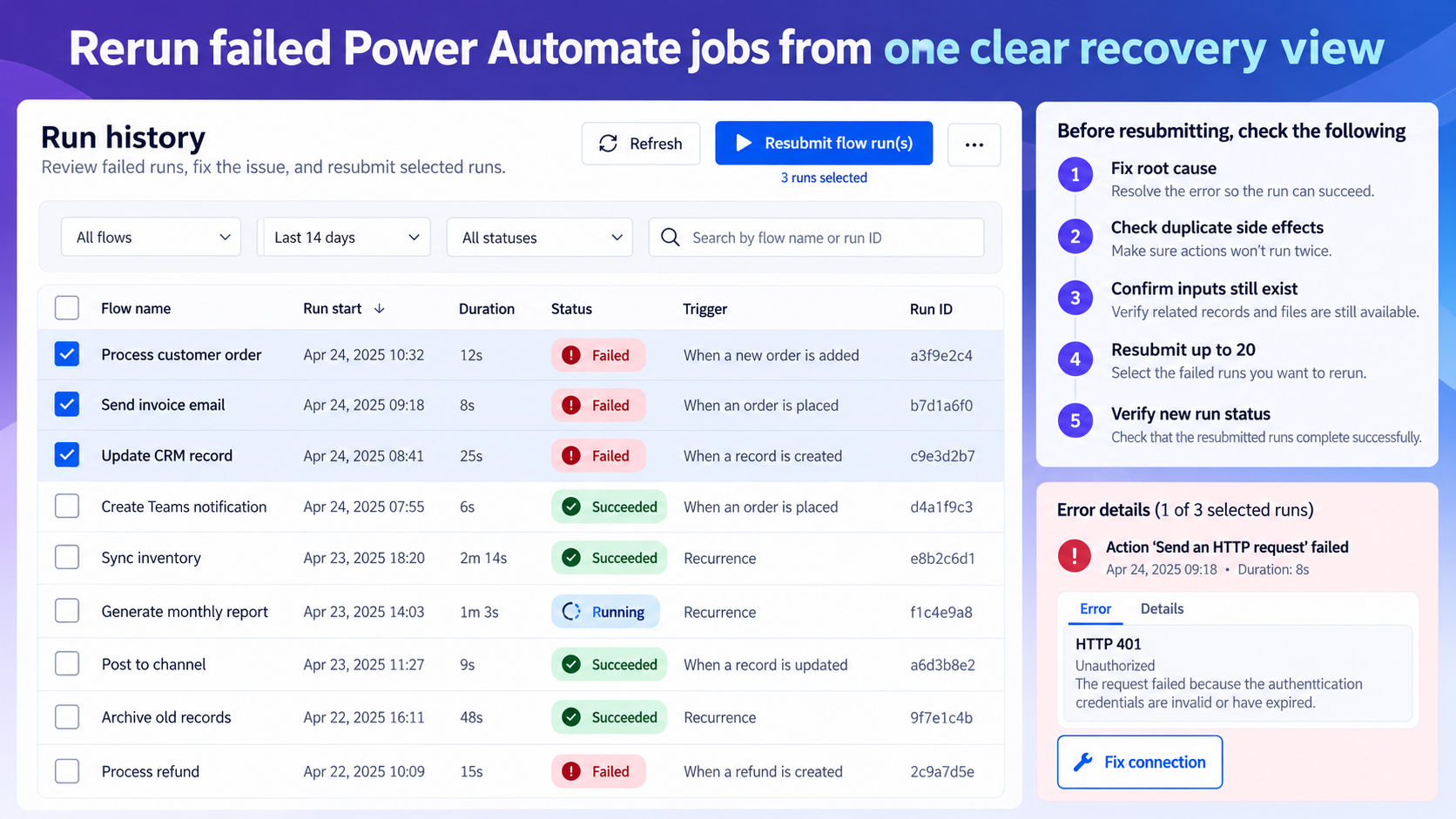
For an Unauthorized error, open Connections and repair or replace the affected connection. For Bad request or Not found, correct the action settings or restore the referenced record. Save the flow and run a controlled test when possible before resubmitting production failures.
Check for duplicate side effects
A failed run can still have succeeded in earlier actions. Verify whether it already created a file, sent a message, added a list item, or updated an external application. Add idempotency checks or a processed identifier when repeating those actions would be harmful.
Confirm the old trigger data is still valid
Resubmit uses the earlier run’s inputs, but referenced files, users, permissions, or records may have changed. A run that failed last week can now write obsolete information or fail at a different step. Review time-sensitive inputs before retrying.
Resubmit failed runs in a controlled batch
On the Run history page, select the failed runs that share the repaired cause and choose Resubmit flow run(s). Microsoft documents a limit of 20 runs per bulk selection. If instant-trigger runs were initiated by other users, an administrator may need to enable the tenant setting that permits resubmission of those runs.
Begin with one or two runs, refresh the history, and confirm that the new instances succeed. Then resubmit the remaining matching failures in groups no larger than the product limit. The run-history troubleshooting checklist is useful when a retry produces a new error instead of clearing the incident.
Verify outcomes instead of trusting the button
A resubmit command only starts new runs. Open the new run instances and confirm Succeeded status, expected duration, and correct outputs. Compare downstream record counts before and after the retry. When the flow touches a shared system, ask its owner to validate a sample rather than relying only on the green status badge.
Keep an incident note with the original run IDs, cause, change made, retry batch, and validation result. If the same fault recurs, improve retry policies, connection ownership, exception handling, or source-data validation. Repeated manual bulk resubmission is a warning that the flow needs engineering work.
Design future flows to be safe to retry
Give each business transaction a stable identifier and check whether the target already contains it before creating another item. Separate reversible preparation steps from irreversible actions such as sending or billing. Configure connector retry policies for transient failures, but do not apply aggressive retries to operations that are not idempotent.
Create an exception path that records the failed business key, stage, and error without exposing secrets. Route actionable alerts to an owner and include a direct run link. A good recovery design makes it clear which runs can be safely replayed and which need a compensating action or manual review.
For high-volume incidents, export a working list of failed run IDs, causes, owners, and retry decisions. Mark each run as safe to resubmit, already completed downstream, or requiring manual compensation. This prevents a second operator from replaying the same failures while the first batch is still being checked, and it creates a concise recovery record for later review. Record the final successful run ID beside each original failure so the recovery can be traced without reopening every row during later audits.
Questions about resubmitting Power Automate runs
How many failed runs can I resubmit at once?
Microsoft’s current bulk-resubmit documentation states that you can select up to 20 runs. Use smaller batches first when side effects or data changes create risk.
Does resubmit use the updated flow definition?
Resubmission behavior can be affected by flow changes and the earlier inputs. Microsoft advises considering how edits made after the original run affect the retry. Test a representative run before a large batch.
Why is the Resubmit option unavailable?
You may lack ownership or permissions, the run type may be restricted, or an administrator may need to allow users to resubmit instant-trigger runs started by others.
Will resubmitting duplicate emails or records?
It can. Any earlier successful action may run again. Inspect the original run and add duplicate prevention before resubmitting workflows with irreversible outputs.
Recover the failed work, not the original mistake
Bulk resubmit is valuable after the failures share a known repaired cause. Inspect representative runs, account for completed side effects, test a small retry, then process up to 20 matching runs and verify the downstream result. Use the incident to make the flow safer for the next failure.