A flow creates duplicates when the same business event reaches Create event more than once, or when an update is mistaken for a new item. Deleting the extra appointments treats the output, not the design. The durable fix is to give each source record one stable Outlook event identity and update that identity on later runs.
Find the second creation in run history
Pick one duplicate pair and compare Created time, subject, start time, organizer, and run IDs. In Power Automate run history, locate every run that wrote those items. Determine whether one trigger fired twice, two active flows watched the same source, or a loop ran Create event for multiple records.
Microsoft documents that the Outlook “When a new event is created (V3)” trigger can fire again when a meeting invitation is accepted because Outlook recreates the event with a new ID and created date. Recurring events can also generate per-occurrence activity.
Avoid destructive cleanup until you know whether the authoritative copy is in the cloud, mailbox, calendar, or local profile. Export or verify important data first. In managed environments, a policy result should be handed to the administrator with exact timestamps and reproduction steps rather than worked around.
Split the create and update decisions
Use a source key that does not change when the title or time changes: a SharePoint item ID, Dataverse row ID, booking ID, or another authoritative identifier. Store the returned Outlook event ID after Create event (V4). On later runs, retrieve that stored ID and call Update event (V4) instead of Create event.
If the source has no stored event ID, search a controlled mapping table rather than scanning the calendar by subject. Subjects are editable and are not unique.
After each change, repeat the smallest test that originally failed. A successful result in a different client narrows the fault but does not automatically repair the original one. Record the boundary, apply the targeted correction, and test again in the user’s normal workflow.
Block echoes and parallel paths
Filter the trigger
Use Action Type, response type, or a source-specific changed flag when available. Keep the condition narrow enough that a flow’s own calendar update does not re-enter the create path.
Check concurrency
Two runs can both see “no mapping yet” and create before either stores the ID. Limit trigger concurrency or use an atomic data-store pattern when simultaneous changes are possible.
Inventory active flows
Confirm there is only one enabled production flow for the source/calendar pair. Copying a flow for testing without disabling its trigger is a common duplicate source.
A useful test changes one variable at a time. Keep the same account and content while switching only the client, then keep the client and switch only the account or item. This produces evidence you can act on instead of a pile of unrelated resets.
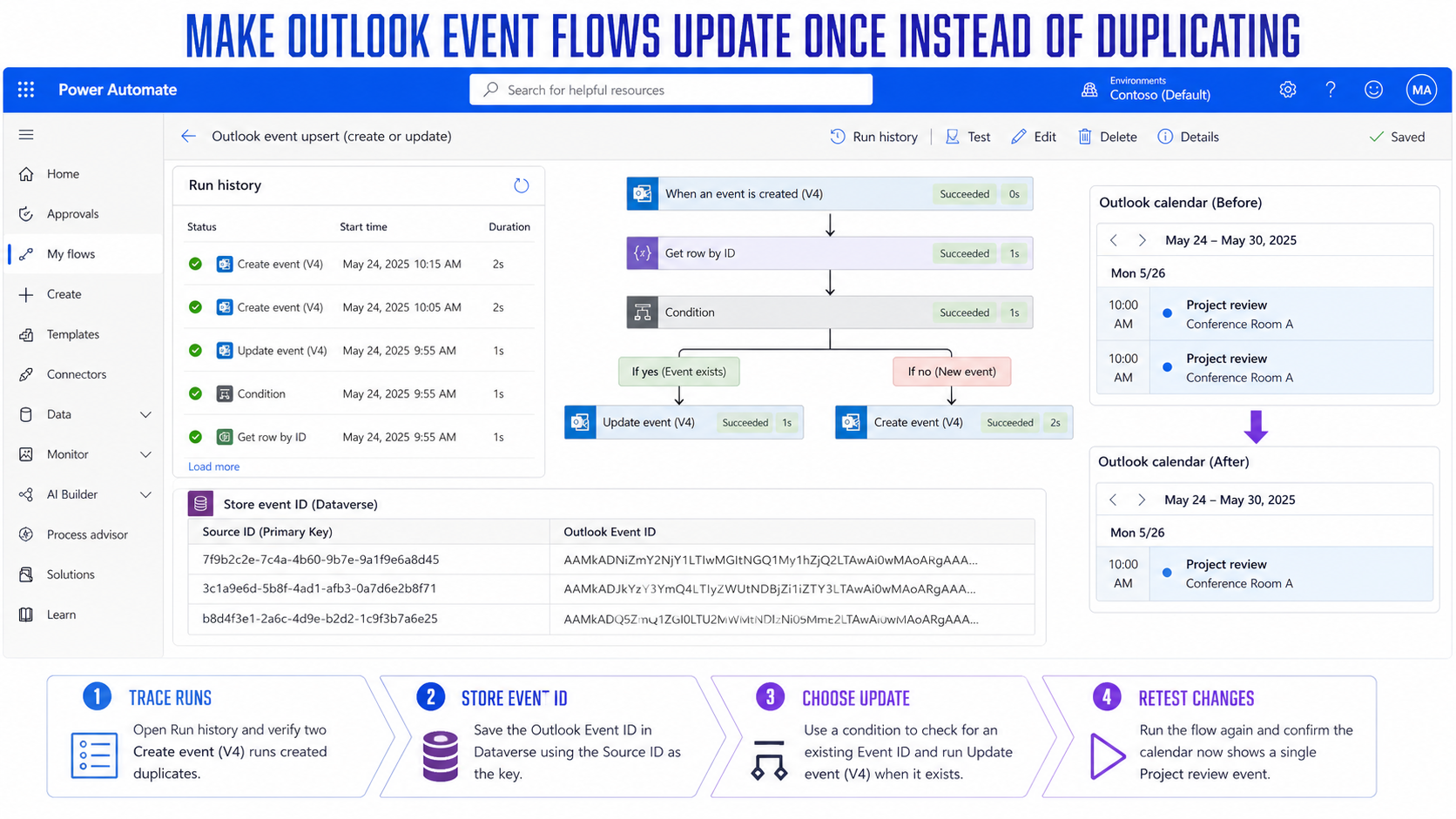
Test with a three-change sequence
Create one source record, change only its subject, then change only its time. The calendar should contain one item whose event ID remains the mapped target. Use the controlled-flow testing pattern to isolate test data, and review how Outlook copies calendar items before assuming every visual duplicate came from automation.
Avoid destructive cleanup until you know whether the authoritative copy is in the cloud, mailbox, calendar, or local profile. Export or verify important data first. In managed environments, a policy result should be handed to the administrator with exact timestamps and reproduction steps rather than worked around.
Clean existing duplicates after the design is fixed
Use a harmless flow run for the final comparison, not the user’s confidential production content. Note the signed-in account, client, approximate time, and exact visible result. Then repeat the same action once from a second supported client. A difference between clients points toward local state or a client-specific experience; the same result everywhere points toward the account, source data, policy, or service.
Keep the test matrix small enough to explain. One row can represent the normal user and original item, a second the same user with a clean test item, and a third an approved comparison account when available. Change only one condition between rows. This discipline matters because simultaneous sign-outs, cache clearing, permission changes, and item recreation can hide the cause and make the next incident harder to diagnose.
Check the owner boundary before applying the result. End users can usually refresh a client, choose a supported item, or correct their own setting. Owners control sharing and source data. Administrators control tenant policy, effective assignments, managed browser rules, licensing, and service-health escalation. Stop at that boundary and provide evidence instead of asking the user to bypass a security decision.
Finally, return to the ordinary workflow and repeat the exact action that failed. Confirm both the immediate screen and the downstream result: the other attendee’s view, the saved calendar item, the mailbox copy, the flow run, the synced browser data, or the participant’s lobby entry. A button appearing is only partial recovery when the expected output is still missing.
Duplicate-event flow questions
Can I deduplicate by Outlook subject and start time?
That can reduce obvious repeats but is not a reliable identity strategy. Two valid meetings may share both values, while a legitimate update can change either one.
Why does accepting an invitation trigger the flow again?
Microsoft notes that Outlook can recreate an accepted event, changing its ID and created date. Filter on response type or other trigger output when that documented connector behavior matches your run history.
What changes for a recurring series?
The changed-event trigger can fire for each occurrence when a series changes. Decide whether your mapping represents the series master or individual occurrences, then test a small series before production.
Design for idempotency
The best result is a repeatable test that identifies the responsible layer and leaves the user’s data and security controls intact. Keep the successful change, undo speculative ones, and share the narrow evidence with the owner of any policy or service dependency. Retest in the normal client before treating the incident as resolved. If the symptom returns, compare it with the recorded boundary before repeating cleanup; recurrence after the same trigger is far more useful than a vague report that the app failed again.