The Power Automate error “expected string but got null” is a data-contract failure. An action or expression expected text, but the current run supplied no value at all. The repair is not to convert everything to a string blindly; it is to decide whether a missing value should be rejected, replaced with a safe default, or allowed to skip the action.
Start with the failed run, because the designer’s sample data may contain a value that the real trigger did not. Expand the first red action and read its Inputs and Outputs before editing the expression.
Find the first null, not the last red card
A later action may report the error even though the null originated in a trigger, SharePoint column, Excel cell, Forms answer, or earlier Select operation. Trace the dynamic-content token backward. Compare one successful run with the failed run and note the exact property that changed from text to null or disappeared.
Distinguish null from an empty string
Power Automate treats null and '' as different values. Microsoft’s expression guidance states that coalesce() handles null but does not replace an empty string. The empty() function returns true for null and for an empty string, which makes it useful when both conditions should follow the same branch.
Do not type the word null in quotation marks when you mean the null value. 'null' is four characters of text and can make a condition appear to pass while the runtime value remains missing.
Inspect optional properties safely
An object may be null before Power Automate reaches the property you want. Microsoft’s null-field guidance shows the question-mark operator for optional navigation, such as triggerBody()?['optionalField']. For nested content, apply safe navigation at the levels that can be absent before giving the result to coalesce().
If this is an early flow and the run-history interface is unfamiliar, the first-flow walkthrough helps orient the trigger, actions, and test pane. Return to the actual failed run before choosing a repair.
Choose the behavior the business process needs
Use one of these patterns according to meaning:
| Missing value should… | Pattern | Example |
|---|---|---|
| Become harmless text | coalesce() |
coalesce(triggerBody()?['Comment'], '') |
| Use a visible fallback | coalesce() |
coalesce(outputs('Get_item')?['body/Title'], 'Untitled') |
| Skip an action | Condition | empty(triggerBody()?['Email']) |
| Stop the run clearly | Condition plus Terminate | Return a business-readable error |
| Convert a present number | string() after validation |
Convert only after confirming it exists |
The default must fit the destination. An empty email address, person ID, or file identifier is rarely safe because the next connector may fail with a less useful message. In those cases, branch or terminate instead of hiding the missing value.
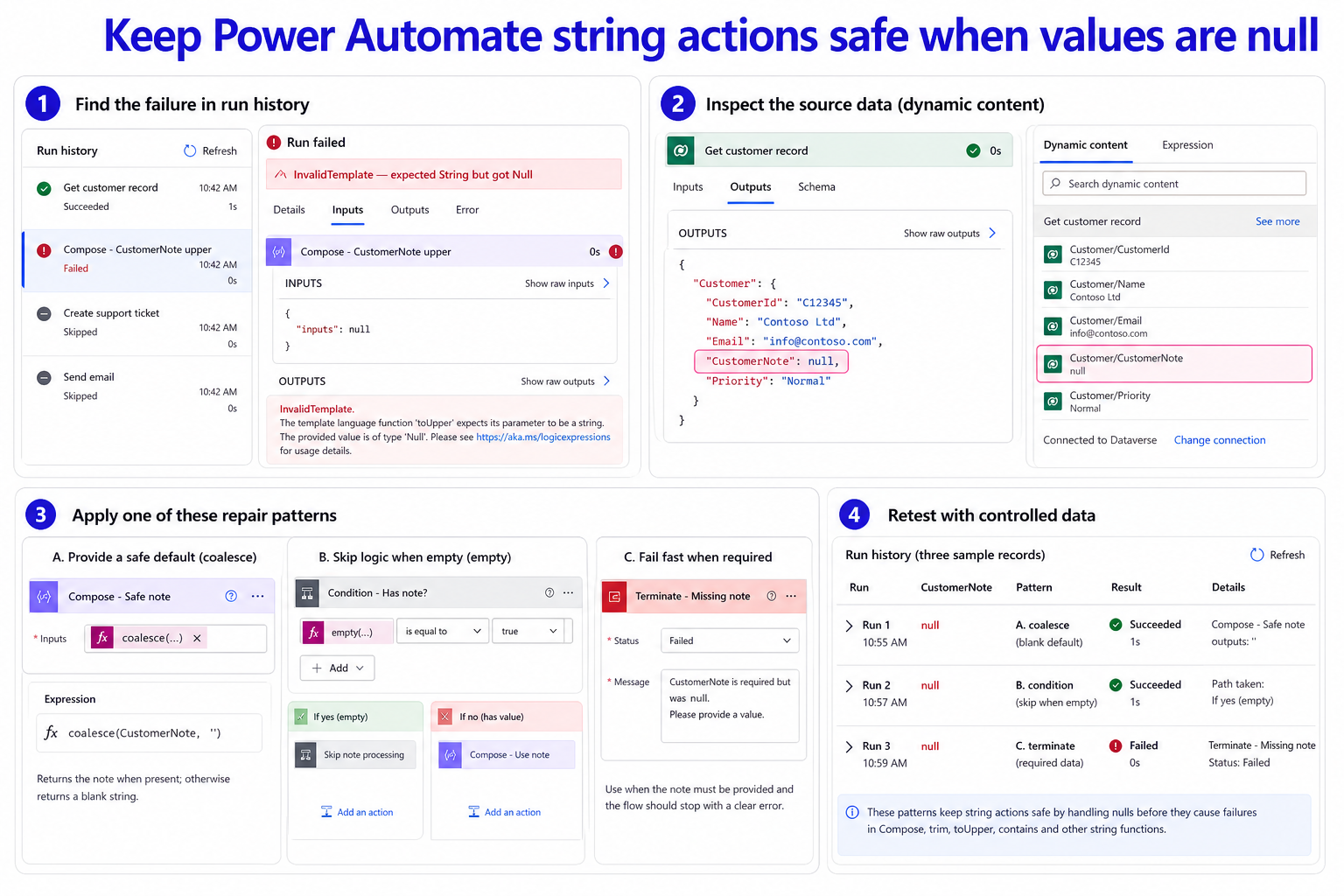
Three practical repair patterns
Text field with an optional comment
For a SharePoint or Forms comment that may legitimately be absent, use a Compose action with a null-safe expression:
coalesce(triggerBody()?['Comment'], '')
Feed the Compose output to the text destination. Test with a populated comment, an empty response, and a run where the property is absent. If blank and null require different business behavior, use empty() only after confirming that merging them is acceptable.
Required identifier that must never be blank
Add a Condition before the dependent action. If empty(<identifier>) is true, terminate with a clear message or route the item to an exception queue. If false, continue. This preserves the contract and prevents an empty default from becoming a misleading 404 later.
Nested response from another action
Use safe navigation before coalesce(), for example:
coalesce(outputs('Get_item')?['body']?['Manager']?['Email'], 'unassigned@example.invalid')
Replace the placeholder with a real approved fallback or choose a branch instead. Do not send mail to a fabricated address; the example simply shows where the fallback belongs.
Fix the source when null is unexpected
If a field is supposed to be mandatory, inspect the upstream form, list, workbook, or API schema. A renamed SharePoint column, blank Excel row, optional form question, or connector schema change can make a formerly reliable token null. Repairing only the downstream expression can conceal a data-quality regression.
For Excel-backed flows, the row-update checks are especially useful when the source table, key column, or blank cell makes dynamic content unreliable. Ensure the workbook contains a real table and that the key identifies one row before defaulting values.
Retest from the trigger with controlled samples. A manual Test using old designer data is not enough. Run the live trigger once with the value, once without it, and once with the source item missing the optional property if that state is possible.
Avoid repairs that move the error
Wrapping every token in string() can turn null into text that looks usable while violating the next connector’s expectations. Likewise, coalesce() returns the first non-null argument; it does not skip an empty string. A default can also erase the evidence needed to understand why a required source field went blank.
Keep a Compose action named for the normalized value when the expression is reused. That makes run history readable and avoids copying slightly different expressions across actions. For production flows, add an exception path that records the source item ID and property name without logging sensitive content.
Null-handling questions
Why did the flow work yesterday with the same design?
The input data changed even if the definition did not. Compare the first failing run with the last successful run at the property level. Optional fields, deleted values, or a different trigger branch commonly expose the missing case.
Is coalesce(value, '') always the correct fix?
No. It is appropriate only when an empty string is a valid substitute. Required recipients, IDs, paths, and keys should usually branch or fail explicitly so the flow does not continue with bad data.
How do I handle both null and blank text?
Use empty() in a condition when both states should be treated as missing. If whitespace-only text matters, normalize it deliberately and test that case separately; do not assume empty() applies the same business rule to spaces.
Why does safe navigation still return null?
The question-mark operator prevents the property access from throwing when an object is absent; it does not create a value. Pair the safely retrieved result with a condition or coalesce() based on what the process should do next.
Make the data contract explicit
The durable repair begins in run history and ends with a documented choice for missing data. Default genuinely optional text, branch around actions that cannot operate without a value, and stop clearly when a required identifier is absent. Then repair the upstream source if null should never have occurred, so the flow remains understandable instead of merely quiet.