A generic “not available” message can sound regional even when the real boundary is the meeting context. Test Copilot in the main meeting and inside a breakout room separately. If it works in the main room, your account, license, and region are less likely to be the primary cause.
Build a two-location test
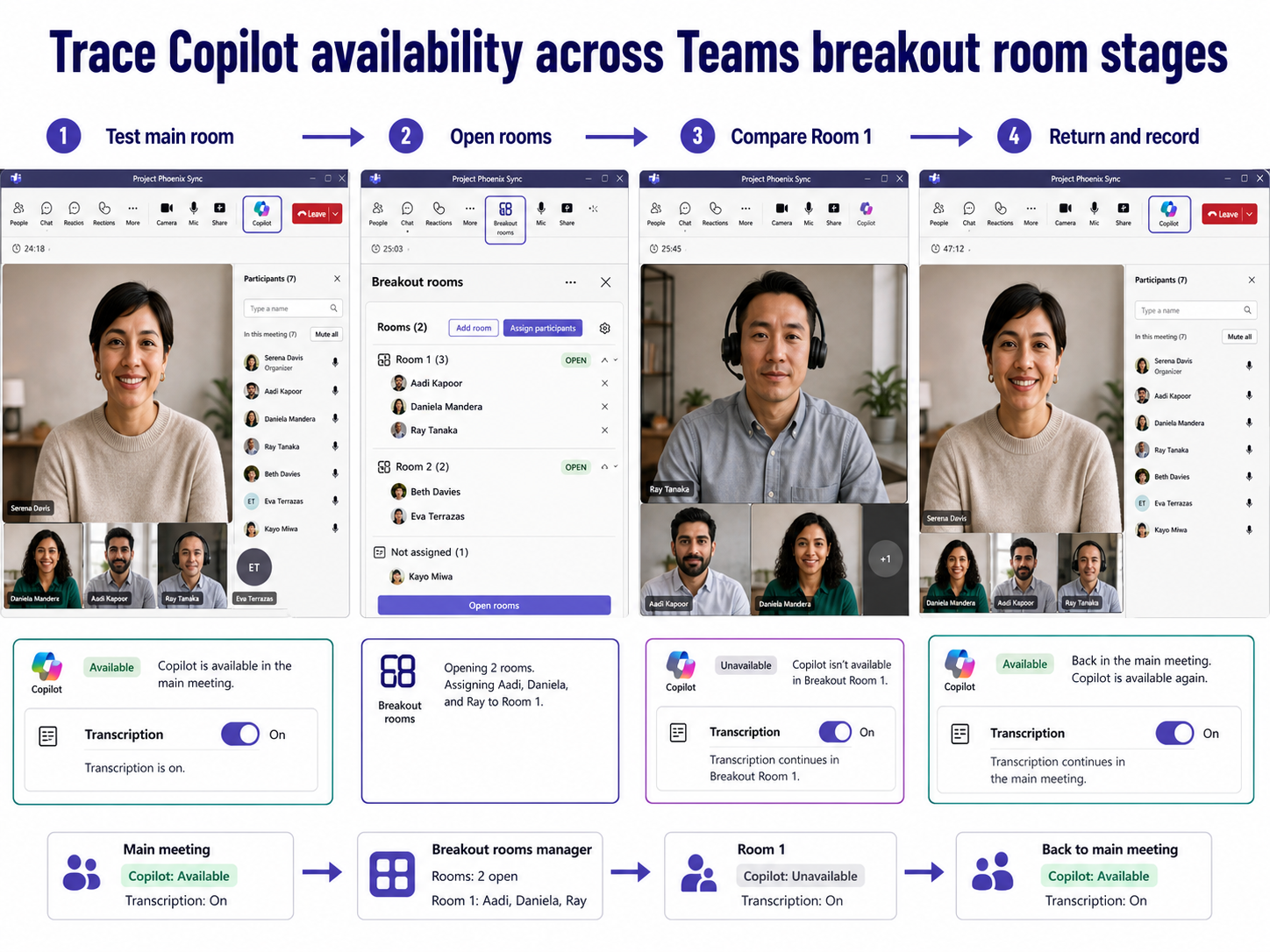
Schedule a small standard Teams meeting, start it with an organizer and one participant, and confirm Copilot behavior in the main room. Then create a breakout room and repeat the same simple prompt there. Record whether transcription is running and whether the Copilot control is present, disabled, or replaced by an error.
This comparison matters because breakout rooms are distinct meeting stages. A capability available to the organizer in the main meeting is not automatically guaranteed in every sub-session.
Avoid destructive cleanup until you know whether the authoritative copy is in the cloud, mailbox, calendar, or local profile. Export or verify important data first. In managed environments, a policy result should be handed to the administrator with exact timestamps and reproduction steps rather than worked around.
Verify the prerequisites that still apply
Confirm the organizer and testing user have the required Copilot entitlement and are signed into the intended work account. Check the meeting policy’s Copilot setting and whether the selected mode requires a saved transcript. The meeting transcription setup explains why a meeting can expose Copilot controls but still lack the content needed for after-meeting results.
After each change, repeat the smallest test that originally failed. A successful result in a different client narrows the fault but does not automatically repair the original one. Record the boundary, apply the targeted correction, and test again in the user’s normal workflow.
Check the room rather than the region
Who owns the breakout controls
Only the organizer or an assigned breakout-room manager can manage rooms. A participant’s missing management controls do not prove Copilot is region-blocked.
What kind of meeting is this
Confirm this is a supported standard meeting and that breakout rooms themselves work. Use the room-control checks if the room button or assignments are also missing.
Does the main meeting recover
Return everyone to the main meeting and retry. Recovery there is strong evidence of a scope limitation rather than a tenant-wide outage.
A useful test changes one variable at a time. Keep the same account and content while switching only the client, then keep the client and switch only the account or item. This produces evidence you can act on instead of a pile of unrelated resets.
Escalate with precise evidence
Give the admin the meeting ID, UTC time, organizer account, assigned meeting policy, client version, and results from both locations. Avoid claiming a regional block unless the service message or official availability documentation names one. The useful support question is whether Copilot is supported for that meeting stage and policy combination.
Avoid destructive cleanup until you know whether the authoritative copy is in the cloud, mailbox, calendar, or local profile. Export or verify important data first. In managed environments, a policy result should be handed to the administrator with exact timestamps and reproduction steps rather than worked around.
Plan the meeting when room support is uncertain
Use a harmless Copilot session for the final comparison, not the user’s confidential production content. Note the signed-in account, client, approximate time, and exact visible result. Then repeat the same action once from a second supported client. A difference between clients points toward local state or a client-specific experience; the same result everywhere points toward the account, source data, policy, or service.
Keep the test matrix small enough to explain. One row can represent the normal user and original item, a second the same user with a clean test item, and a third an approved comparison account when available. Change only one condition between rows. This discipline matters because simultaneous sign-outs, cache clearing, permission changes, and item recreation can hide the cause and make the next incident harder to diagnose.
Check the owner boundary before applying the result. End users can usually refresh a client, choose a supported item, or correct their own setting. Owners control sharing and source data. Administrators control tenant policy, effective assignments, managed browser rules, licensing, and service-health escalation. Stop at that boundary and provide evidence instead of asking the user to bypass a security decision.
Finally, return to the ordinary workflow and repeat the exact action that failed. Confirm both the immediate screen and the downstream result: the other attendee’s view, the saved calendar item, the mailbox copy, the flow run, the synced browser data, or the participant’s lobby entry. A button appearing is only partial recovery when the expected output is still missing.
Copilot and breakout-room answers
Why does Copilot appear before rooms open and disappear afterward?
The control can be scoped to the main meeting experience while breakout sessions have different feature availability. Confirm current support with your tenant administrator rather than treating the change as a licensing failure.
Does turning on transcription guarantee Copilot in every room?
No. Transcription can be a prerequisite without being a guarantee for every meeting context. It also depends on policy, license, organizer settings, and supported client behavior.
Should I change my account region to fix this?
Not on the basis of breakout-room behavior alone. First prove that Copilot fails in supported main-meeting scenarios and review official regional availability for the tenant.
Set expectations before participants split
The best result is a repeatable test that identifies the responsible layer and leaves the user’s data and security controls intact. Keep the successful change, undo speculative ones, and share the narrow evidence with the owner of any policy or service dependency. Retest in the normal client before treating the incident as resolved. If the symptom returns, compare it with the recorded boundary before repeating cleanup; recurrence after the same trigger is far more useful than a vague report that the app failed again.